
How to Set Up Leveling on Discord
To set up leveling in Discord, add a leveling bot, turn on XP and decide how members earn it and what they get for leveling up. In Voinly's leveling bot you turn on Levels in the dashboard, set XP for messages and voice, add role rewards and level-up messages, and members check their progress with /rank, for free. A level-up line is not a welcome message.
Updated
Quick steps
The short version. XP numbers, role rewards and troubleshooting are further down. Level-up messages can be plain text or a Discord embed from the Discord embed builder. New members still need a welcome message, and the server size can sit in a member tracker channel. The welcome message, the member tracker and the embed builder are on the Voinly homepage.
- Open Levels and press "Turn on Levels".
- Under Earning XP, set Minimum XP per message and Maximum XP per message. Turn on Earn XP in voice channels if voice should count.
- Add a Level and a Role under Role rewards.
- Pick Where to announce level-ups. On a busy server, turn on Only announce levels that give a role.
- Chat, then run
/rank.
How XP and levels work
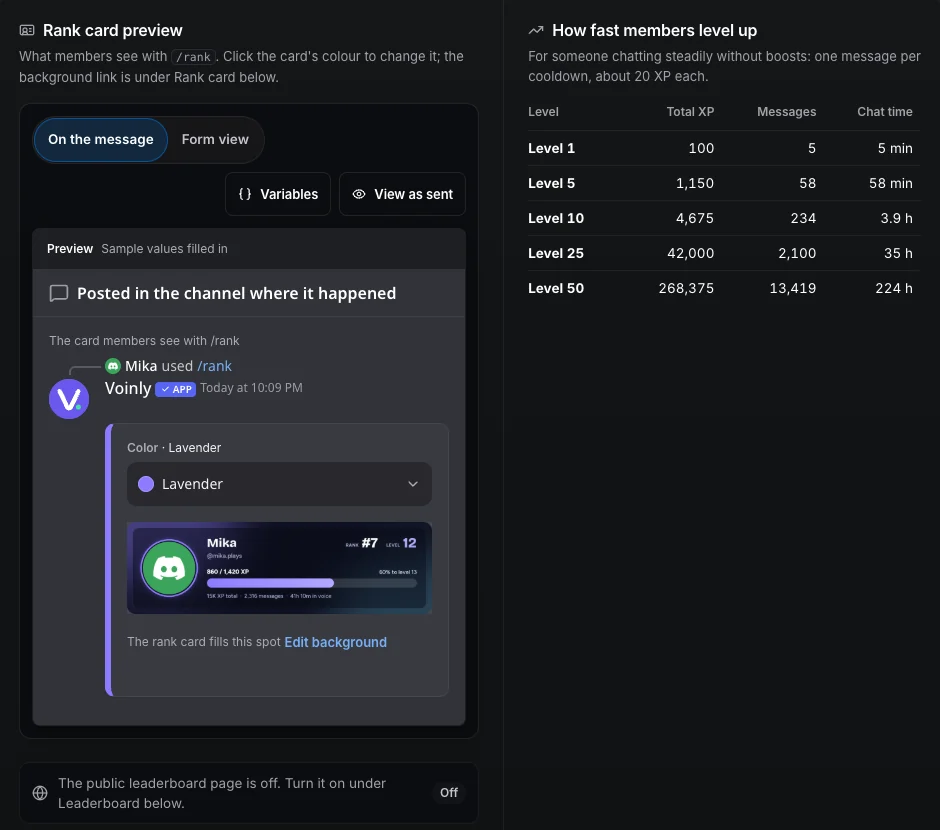
Each message earns a random amount of XP between a minimum and a maximum, 15 to 25 by default, but only once per cooldown (60 seconds by default). That stops spam from paying off: ten messages in ten seconds earn the same as one. Time in voice can earn XP too, 10 per minute by default, as long as at least two people are in the channel. Deafened members and the AFK channel don't earn any.
Levels follow a fixed curve: going from level L to L + 1 costs 5 × L² + 50 × L + 100 XP. It is the same curve MEE6 uses, so the numbers feel familiar to members who used it.
| Level | Total XP | Messages | Chat time |
|---|---|---|---|
| 1 | 100 | 5 | 5 min |
| 5 | 1,150 | 58 | 58 min |
| 10 | 4,675 | 234 | 3.9 h |
| 25 | 42,000 | 2,100 | 35 h |
| 50 | 268,375 | 13,419 | 224 h |
Prepare your server
- Reward roles: create them in Server Settings → Roles, for example "Level 5", "Level 10" and "Regular". Give them a color or channel access if they should mean something.
- Role order: drag the Voinly role above every reward role. Discord doesn't let a bot give a role that sits above its own. The roles guide covers that order, Manage Roles and roles an integration manages.
- A level-up channel such as #level-ups, if you don't want announcements in every chat.
- Places that shouldn't earn XP, like bot command or spam channels. Note them for step 3.
Settings that suit your server
- Small or new servers: keep the defaults and add rewards at low levels, such as 3, 5 and 10, so members feel progress in the first week.
- Busy servers: raise the cooldown a little or lower the XP per message, and turn on announcements only for levels that give a role.
- Voice communities: turn on voice XP. Temporary rooms from the join-to-create guide earn it too, unless you add them to the no-XP list. Deafened members, bots and the AFK channel never earn voice XP, and a channel needs at least two people who can hear.
- Boosters and events: a 1.5× or 2× role boost for server boosters, or a channel boost for an event channel, rewards what you want to see more of. Self-assign colors and pings stay on the reaction roles guide. A starting role on join is Join roles, not a level reward.
- XP is not a currency members spend. A shop, daily rewards and games are the Discord economy bot.
Leveling troubleshooting
- Nobody is earning XP. Levels has to be on. A role in Roles that don't earn XP, such as an unverified role from the verification guide, blocks that member. A channel in Channels where XP is off blocks everyone there.
- Messages seem to do nothing. Only one message per Cooldown counts, 60 seconds by default. Ten messages in a few seconds earn the same as one.
- Voice time is not counting. Earn XP in voice channels must be on, Voice XP must be above 0, and at least two people who are not bots and not deafened must be in the channel. The server's AFK channel is skipped.
- The reward role never arrives. Voinly's role has to sit above the reward role and have Manage Roles. A deleted role or a managed role cannot be given. See the roles guide.
- Minimum XP per message is higher than the maximum. Save refuses that. Put the smaller number in Minimum XP per message.
How to set up leveling with Voinly
-
Turn on Levels
In the dashboard, open Levels and press "Turn on Levels". The page opens with a preview of the rank card and a table of how fast members level up with your current settings.
-
Set how members earn XP
Under "More settings", in Earning XP, set the Minimum XP per message, Maximum XP per message and Cooldown. Turn on Earn XP in voice channels and set Voice XP if voice chat matters in your server.
-
Add boosts and no-XP zones
In XP boosts, add Role boosts or Channel boosts with a Multiplier from 0× to 10×, for example 1.5× for server boosters. A category boost covers every channel in it, and role and channel boosts multiply together. In No-XP zones, list Roles that don't earn XP and Channels where XP is off.
-
Choose the level-up message
In Level-up message, set Where to announce: Don't announce, Where they chatted, One channel I pick, or In a DM to them. Write the Message with
{user},{level},{rank}or{reward}. On a busy server, turn on Only announce levels that give a role so the rest level up quietly. -
Add role rewards
In Role rewards, add up to 100 Rewards, each a Level and a Role. Turn on Remove previous reward role to keep only the highest, or leave it off to let members collect them all. Take roles away when members lose levels applies when staff remove XP. Members who leave and rejoin get their rewards back.
-
Style the rank card and leaderboard
In Rank card, pick an Accent color and an optional Background image link (a wide 1000 × 300 image looks best). In Leaderboard, turn on Public leaderboard page for a web page anyone with the link can open, choose a Short address and optionally Show a Join server button.
-
Test it
Chat for a minute, then run
/rankto see your card and/levels rewardsto check the reward list. To test a reward without grinding, give yourself XP with/xp giveand take it back with/xp remove.
Leveling guide commands
| Command | What it does | Who can use it |
|---|---|---|
/rank [user] | Show your rank card, or another member's. | Everyone |
/leaderboard | See the most active members in the server. | Everyone |
/levels rewards | List the roles members earn by leveling up, and how XP works here. | Everyone |
/xp give <user> <amount> | Give XP to a member. | Manage Server |
/xp remove <user> <amount> | Take XP away from a member. | Manage Server |
/xp set <user> <amount> | Set a member's total XP. | Manage Server |
/xp reset <user> | Reset a member's XP and level to zero. | Manage Server |
Frequently asked questions
Why aren't members getting XP?
The bot can't give the reward role
Can I bring XP over from MEE6 or another bot?
/xp set, and since the curve matches MEE6's, the same XP gives the same level.How much XP does level 10 take?
Do temporary voice channels earn XP?
Is it free?
How do I set up leveling on Discord?
/rank. Leveling is free.Does Discord have built-in leveling?
/rank and gives role rewards, and it is free.What is a free XP bot on Discord?
How do members check their level?
/rank for the rank card and /leaderboard for the most active members. /levels rewards lists the roles. Staff with Manage Server can set a total with /xp set.Add Voinly to your server
Every Voinly module is free. The only paid extras are Custom bot and extra AI moderation scans (see pricing). Add it to Discord and set it up from the dashboard.
Add to Discord