


Discord welcome bot with welcome cards and DMs
Voinly is a free Discord welcome bot that greets every new member in a channel or by DM, attaches a welcome card with their avatar and name, says goodbye when people leave and builds the channel newcomers read first. You write each message next to a live preview. The Discord welcome message guide has copy-paste examples.
Welcome messages in a channel or by DM
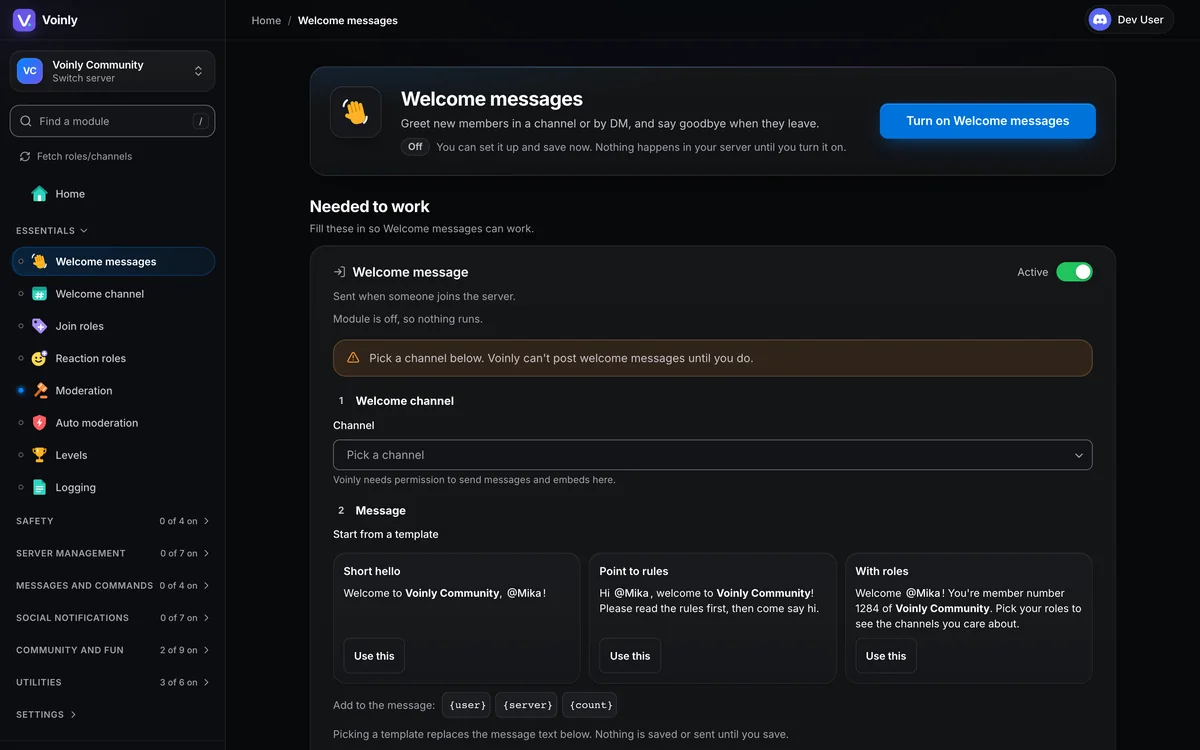
Pick a channel and write the message Voinly posts when someone joins. It can be plain text or a full embed with a title, color, fields, images and a footer. Placeholders fill in the details for each member: {user} mentions them, {user.name} is their name and {server.member_count} is how many members you have now.
Busy servers can set the welcome to delete itself after a set time, up to seven days, so the channel doesn't fill up with greetings. A separate direct message can go to the new member as well, which is a good place for links and first steps that would clutter a public channel.
Welcome card images
Turn on the welcome card and Voinly attaches a generated image to the welcome message, showing the member's avatar and name. Choose one of five built-in backgrounds or use your own image link, then edit the title, subtitle and accent color so the card matches your server.
- Backgrounds: aurora, midnight, sunset, forest, mono or a custom image
- Title and subtitle accept placeholders, for example
Welcome, {user.name}! - An accent color to match your server's branding
Leave messages for leaves, kicks and bans
A leave message can post in any channel when someone leaves, is kicked or is banned. Many servers use it to keep a quiet record of who left and how many members remain. Bots can be ignored, so adding or removing a bot never posts a greeting or a goodbye.
Announce role changes
Pick up to 25 roles and Voinly posts a message when a member gets one of them, such as a verified, booster or staff role. You can post a second message when the role is taken away, with its own text.
Build a welcome channel
The first channel a newcomer opens says a lot about a server. Voinly's Welcome channel stacks up to 10 blocks into one tidy channel, posts them in order and keeps them up to date when you edit them.
- Banner: an image with a caption
- Text: any message, with embeds
- Links: your website, socials or other servers
- Rules: the rules members should read first
- Team: lists the members of up to 10 roles, so people know who to ask
- Invite: a generated invite that lasts 1 day, 7 days or never expires
Test before members see it
Every editor shows a live Discord-style preview while you type. When you're happy, run /welcome test or press the test button in the dashboard: Voinly sends the saved welcome message, with its card, and the join DM if it's on, to you, so you check the real thing without anyone new joining.
Want roles on join too? Join roles works next to the welcome message. See the autorole bot page for roles on join and rejoin. The Discord welcome message guide walks through Discord's own greeting, copy-paste examples and how to change the text.
How to set up a welcome message in Discord
-
Add Voinly to your server
Click Add to Discord and pick your server. Voinly asks only for the permissions it uses, never Administrator. Then open the dashboard and choose the same server.
-
Open Welcome messages
In the dashboard, open Welcome messages under Essentials. Turn on Send a welcome message and pick the channel it posts in. Make sure Voinly can see and send messages in that channel.
-
Write the message and add a card
Write your message with placeholders like
{user}, then turn on Attach a welcome card and pick a background. Add a DM or a leave message in the sections below if you want them. -
Save and test it
Save, then run
/welcome test. The welcome message and card arrive in your DMs exactly as a new member would see them.
Welcome bot commands
| Command | What it does | Who can use it |
|---|---|---|
/welcome test | Send the welcome message, and the join DM if it's on, to yourself to check how they look. | Manage Server |
/joinroles sync | Give the join roles to every existing member who's missing them. | Manage Server |
/joinroles stop | Stop a running sync. | Manage Server |
/joinroles check | Check that Voinly can give every join role. | Manage Server |
/role add <member> <role> [reason] | Give a role to a member. | Manage Roles |
/role remove <member> <role> [reason] | Take a role away from a member. | Manage Roles |
/role info <role> | Show details about a role. | Everyone |
/role members <role> | List the members who have a role. | Everyone |
Frequently asked questions
Is the Voinly welcome bot free?
Can Voinly send a welcome image?
Can it welcome people by DM instead of in a channel?
Does it post a message when someone leaves?
Can I move my welcome message from another bot?
Why doesn't my welcome message show up?
Add Voinly to your server
Every Voinly module is free. The only paid extras are Custom bot and extra AI moderation scans (see pricing). Add it to Discord and set it up from the dashboard.
Add to Discord