
How to Add a Member Count Channel in Discord
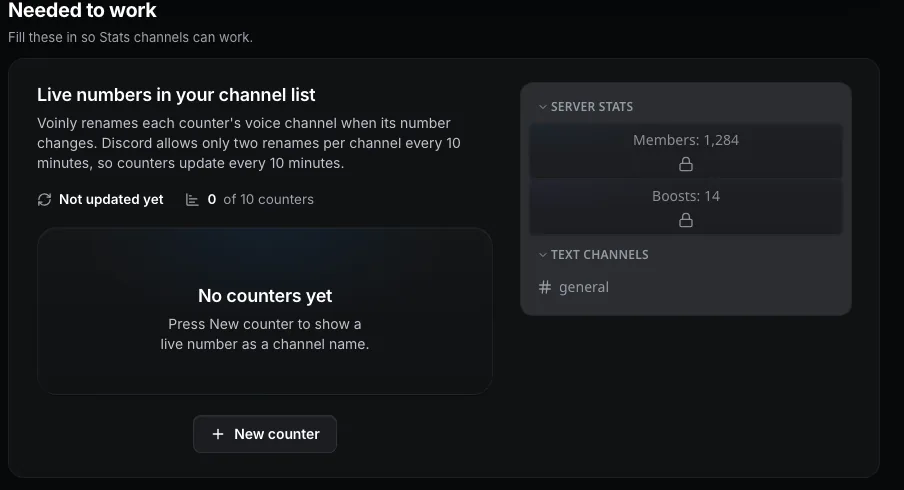
To add a member count channel in Discord, rename a voice channel so its name shows a live number. Discord has no setting for that, so a bot does it. A Discord member count channel looks like Members: 1,234 at the top of your channel list. Here is how to set it up with Voinly's Discord member count bot, and how often it can really update.
Updated
How to see the number of people in a Discord server
To see the number of people in a Discord server, start with Discord itself. You do not need a bot for a one-time look at the amount of people in the server. A member count channel is the next step when that number should sit in the sidebar for everyone.
On desktop, open any channel and press the people icon at the top right to show the member list. It groups Online and Offline. On a small server those two groups add up to everyone. On a large server Discord only loads part of the offline list, so the list is not a full count.
For the full number, click the server name, open Server Settings, then Members, if you can manage the server. That page lists every member. In a Community server, people who can open Server Insights see the member total there too, plus how it changes.
On the phone, tap the server name, then the members icon. The same limits apply: the list is a good look at who is around, and Server Settings, then Members, is the reliable total.
Once you know the number, track member count in the channel list with the Discord member count bot. The steps below create a voice channel whose name shows the count and updates when people join or leave. Anyone can also run /membercount. Voinly replies with the member total, and when it can, humans, bots, new members and an approximate online count. A channel name still cannot show who is online.
Use Voinly as a member tracker
Use Voinly as a member tracker by putting the live member count in a voice channel name, then keeping a record of joins beside it. The channel from the steps on this page is the member tracker people see in the sidebar, with a name such as Members: 1,234. Discord allows only two renames per channel every 10 minutes, so Voinly checks every 10 minutes and renames the channel only when the number changed.
Who joined, and who invited them, is tracked next to that number. The welcome message guide sets the greeting and the leave message for people who leave, are kicked or are banned. The Discord invite tracker shows which member invited each new person, and how many stayed or left. Logging keeps a staff record of each join and leave. These modules are on the Voinly homepage. The greeting can be an embed from the Discord embed builder.
Why a voice channel
Voice channel names show up in the sidebar with no # and no unread dot, and nobody needs to post in them, so they work well as signs. Put them in a category such as Server stats at the top. The trick is making sure nobody actually joins them, which Voinly handles for you.
A counter shows the size of the server. It does not show who invited those members. That is the Discord invite tracker.
What you can count
Each counter shows one number. You can have up to 10, chosen in What to count:
| Counter | Shows |
|---|---|
| Total members | Everyone in the server, people and bots. |
| Humans and Bots | People only, or bots only. |
| Server boosts, Boost level, Members boosting | Your boost total, tier and the number of boosters. |
| Members with a role | How many members have a role you pick, such as Verified or Subscribers. |
| Members in voice | How many people are in voice channels right now. |
| Roles, Channels, Text channels, Voice channels, Categories | The size of your server's structure. |
| Emojis and Stickers | How many custom emojis and stickers you have. |
Online member counts
An online count isn't available yet. Discord only tells a bot who is online after the bot's owner turns on a special Discord setting for it, and that setting is off for Voinly.
How often the count updates
Voinly checks every counter every 10 minutes and renames a channel only when its number changed. It can't be faster than that for long: Discord allows only two renames per channel every 10 minutes, and any bot that tries more gets held back. So a count shown in a channel name is always a few minutes behind, which is fine for a sign.
Need it now? /stats refresh updates every stats channel immediately, unless Discord's rename limit says to wait. /stats list shows each counter, its value and when it updates next.
Templates and number styles
The Channel name template uses {count} for the number and {name} for the counter's name, like Members or the role name. Leave it empty for names like Members: 1,234. Some ideas:
👥 Members: {count}🚀 Boosts: {count}{name}: {count}with a Members with a role counter shows the role's name.
Number style
Number style chooses between 1,234, 1.2k and 1234. The compact style changes less often on a large server, so it uses fewer renames.
Lay out a stats category that looks good
Two or three counters are plenty. More than that pushes your real channels down the list and uses up renames for numbers nobody reads. A layout that works for most servers:
- A Server stats category at the very top, collapsed by default for regulars.
- Total members or Humans first, since that is the number people look for.
- One goal-related counter second, such as Server boosts while you're working towards the next boost level, or Members with a role for a Verified or Subscriber role.
- Drag the channels into the order you want in Discord. Voinly only renames them, so it never moves them around.
Use the number in messages too
A counter channel is only one place to show the size of your server. Voinly's welcome messages can include the member count as a placeholder, so each newcomer sees which member they are, and /membercount answers anyone who asks.
Troubleshooting member count channels
The number doesn't change
Voinly needs Manage Channels on the counter channel to rename it. If Discord is rate-limiting renames, the dashboard and /stats list say so, and Voinly tries again later on its own.
Members can still join the counter
Turn on Stop members from joining counter channels and give Voinly Manage Roles, or deny Connect for @everyone on the channel yourself.
Set up a member count channel with Voinly
-
Open Stats channels
In the dashboard, open Stats channels under Server management and press New counter.
-
Pick what to count
Set What to count to Total members, or Humans if you don't want bots counted. For a role counter, choose Members with a role and pick the Role.
-
Choose or create the voice channel
Under Voice channel, pick an existing voice channel, or let Voinly create one for you. Set the Channel name template and the Number style.
-
Stop people joining, then turn it on
Under More settings, keep Stop members from joining counter channels on, so Voinly denies Connect for
@everyoneand the channel stays display-only. Press Turn on Stats channels, then run/stats refreshto see the first number.
Member count guide commands
| Command | What it does | Who can use it |
|---|---|---|
/stats refresh | Update every stats channel now instead of waiting. | Manage Server |
/stats list | Show each counter, its value and when it updates next. | Manage Server |
Frequently asked questions
How do I see the number of people in a Discord server?
/membercount.Can I use Voinly as a member tracker?
Members: 1,234 that Voinly updates after people join or leave. To see who invited each member, follow the Discord invite tracker. A leave message is part of welcome messages, and logging records joins and leaves for staff.Does a member tracker show who joined and who left?
Why does my member count channel update slowly?
Can I show the number of online members?
Does the member count include bots?
How many counters can I have?
Is it free?
How do I add a member count channel in Discord?
What is a Discord member count channel?
Members: 1,234. Voinly can run up to 10 counters: total members, humans, bots, boosts, members with a role, members in voice, or the size of the server. Turn on Stop members from joining counter channels so the channel stays display-only. That needs the Manage Roles permission.How do I list the member count in Discord?
/membercount. Voinly replies with the member total. When it can see the member list, the reply also shows humans, bots and new members, plus an approximate online count. A channel name still cannot show who is online.Does Discord have a built-in member count channel?
/stats refresh updates the counters unless Discord's rename limit says to wait.Add Voinly to your server
Every Voinly module is free. The only paid extras are Custom bot and extra AI moderation scans (see pricing). Add it to Discord and set it up from the dashboard.
Add to Discord