
How to Set Up Verification in Discord
To set up verification in Discord, hide your channels until a new member passes a check. Discord verification is how you verify members on Discord before the rest of the server opens. A Discord verify member check hides your channels from @everyone, gives access to a verified role, and lets a bot hand out that role once they pass. This guide covers Discord's own settings first, then a button, captcha or math check with Voinly's verification bot.
Updated
What does "verify member" mean on Discord?
Discord verification is the name for that step: verify members on Discord before they can read the channels. On Discord, verify member means a newcomer proves they are a person, then receives a role that can see the server. Discord's own verification level is a different switch: it only decides who may send messages, based on a verified email, account age or a phone number. It does not ask a question and it does not hand out a Member role.
A verify step on top of that is a button, a captcha or a math question. Passing it gives the role that opens your channels. Voinly's verification bot does that from the dashboard, and can also DM the new member a Verify button so they do not have to hunt for the channel.
Quick steps to verify members on Discord
Discord verification takes a few minutes once the roles exist. Do these in order, then use the longer steps further down if a button does nothing.
- Create a Member role. Turn off View Channels for @everyone, and allow View Channel for Member.
- Make a #verify channel that newcomers can see but cannot send messages in.
- Drag Voinly's role above Member. Open Verification and pick Button, Captcha or Math question.
- Put the Member role in Give these roles, post the panel in #verify, and turn Verification on.
What Discord's own verification level does
Every server has a verification level under Server Settings, in the safety or moderation section (Discord has renamed it over the years). It decides who may send messages, not who may join. The levels are:
- None: anyone can talk straight away.
- Low: the account needs a verified email address.
- Medium: the account must also be older than 5 minutes.
- High: the member must also have been in your server for 10 minutes.
- Highest: the account needs a verified phone number.
Why it is not enough on its own
The verification level is a good first filter, and Medium or High stops many throwaway accounts. But it can't ask a question, it can't keep newcomers out of your channels while they wait, and spam tools create accounts with verified emails easily. A verification gate adds a step a script has to pass before it sees anything. Keep the level at Low or Medium, and add the gate on top.
Verified role or unverified role: pick one pattern
There are two ways to build a gate. Both work with Voinly, so pick the one that fits your server.
- A verified role (recommended).
@everyonecan see only a#verifychannel. A role such as Member can see everything else. Passing the check gives the Member role. This is the easiest to keep right, because a new channel you create is hidden from@everyoneas long as its category is. - An unverified role. New members get an Unverified role on join, that role is denied View Channel everywhere except
#verify, and passing the check takes it away. Use this when your existing members have no common role yet, since it leaves them alone. The catch: every new channel needs that deny added by hand.
Lock your channels with permissions
For the verified role pattern, open Server Settings, then Roles, and create a Member role. Edit @everyone and turn off View Channels, then turn it on for Member. Your existing members need the Member role too, or they lose access: you can give it to everyone at once with Voinly's Join roles sync, or by hand.
Next, create a #verify channel. In its Edit Channel, then Permissions, allow View Channel for @everyone and deny Send Messages, so the channel stays clean and holds only the panel. Then hide it from Member, so verified people don't see it any more.
Last, check the role order. Drag Voinly's own role above the Member role under Roles. Discord only lets a bot give roles that sit below its highest role, and this is the most common reason a verify button seems to do nothing.
Advanced verification: a web check before access
If raids or ban evaders are a real problem, turn on Use Advanced verification at the top of the Verification page. Each member then gets a personal link to a web page, which only works for their account, and passes in Discord only after the checks there. The page is translated into seven languages. It adds:
- Stop VPNs and proxies, which also covers Tor and hosting providers. Detection can be wrong, so members can retry, and a stop never kicks or bans anyone.
- Region lock, to allow or block chosen regions. The country is used for the check and never kept.
- Catch alt accounts, which links a newcomer to an earlier account by signed-in accounts, the same device (members are asked first and can decline) or the same network. A link is a hint, not proof, so you choose what happens: verify them and flag it, hold for review, or don't let them through.
- A rule on Discord account age, and a Reviews tab where staff approve or deny held members, also with
/verifyreview.
When the web checks can't run
The VPN and region checks need a lookup service on Voinly's side. When a check can't be run, the setting When a check can't be run decides: hold for review, don't let them through, or let them through. Nobody is kicked or banned because a check couldn't run. The dashboard's setup checklist tells you what is still missing.
Troubleshooting verification
Members press Verify and nothing changes
Voinly's role is below the role it should give, or it lacks Manage Roles. Move it up under Roles. The dashboard checks this for you next to Give these roles.
Verified members still can't see channels
A channel or category has its own deny for Member, or still hides itself from everyone but staff. Open the channel's Permissions and look for a red cross on Member.
New members skip verification entirely
Another bot, or Voinly's Join roles, gives the Member role on join. Remove that role from any join role list, or the gate is open before anyone verifies.
Set up verification with Voinly
-
Choose how members verify
In the dashboard, open Verification under Safety. Under How members verify, pick the Method: Button (one click, stops the simplest raid bots), Captcha (4 to 8 characters, set in Characters in the captcha) or Math question. Under More settings, Tries before failing and After too many wrong answers choose between Make them wait and Kick them. Waiting is kinder, because real people mistype too.
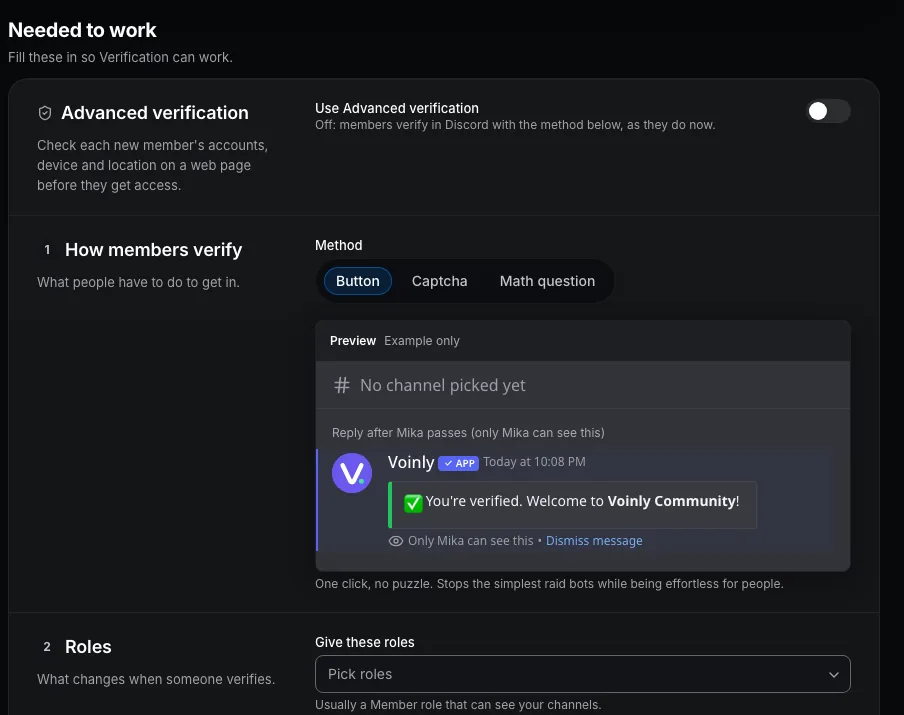
The method picker and the roles a member gets, with a live preview. -
Set the roles
Under Roles, put your Member role in Give these roles. For the unverified role pattern, pick it in Take away this role and turn on Give this role to new members, so Voinly adds it on join and removes it on success.
-
Post the verification panel
Under Verification panel, pick your
#verifyChannel, and set the Button color, Button label and Button emoji. Edit the panel message with the live preview, then publish it. You can also post or move it from Discord with/verifypanel [channel]. Under Messages members see you can reword the captcha and the reply people get once they're in. -
Help newcomers find it, and clear out the rest
Under New members, turn on DM new members how to verify and Let them verify from the DM, so nobody has to hunt for the channel. Kick if not verified within removes accounts that never verify. Leave it at 0 to never kick. Voinly only kicks while members have a way to verify, and needs the Kick Members permission.
-
Add a log channel and turn it on
Pick a private Log channel: Voinly posts who verified, who failed and who was kicked. Then press Turn on Verification. Test with an alt account, or use
/verifyyourself. Staff can let someone in by hand with/forceverify, or send them back with/unverify.
Verification guide commands
| Command | What it does | Who can use it |
|---|---|---|
/verify [member] | Start verification for yourself. Staff can name a member to verify them by hand. | Everyone |
/forceverify <member> [reason] | Verify a member by hand, skipping every check. | Staff: Timeout Members, Kick Members, Ban Members, Manage Messages or a moderator role |
/sendverify <member> | Send a member their verification link by DM and private thread. | Staff: Timeout Members, Kick Members, Ban Members, Manage Messages or a moderator role |
/verifypanel [channel] | Post or update the verification panel. Name a channel to move it there. | Server managers: Manage Server or a manager role |
/unverify <member> | Take a member's verified roles away so that they have to verify again. | Staff: Timeout Members, Kick Members, Ban Members, Manage Messages or a moderator role |
/verifyinfo <member> | Show a member's verification status, last result and linked accounts. | Staff: Timeout Members, Kick Members, Ban Members, Manage Messages or a moderator role |
/verifyunlink <member> [platform] | Stop matching a member to their linked accounts in this server. | Server managers: Manage Server or a manager role |
/verifyreset <member> | Clear a member's wait, tries, link and waiting review so they can start again. | Staff: Timeout Members, Kick Members, Ban Members, Manage Messages or a moderator role |
/verifyreview <member> <decision> [reason] | Approve or deny a member who is held for review. | Staff: Timeout Members, Kick Members, Ban Members, Manage Messages or a moderator role |
Frequently asked questions
What does "verify member" mean on Discord?
How do I verify members on Discord?
@everyone and let a verification bot give a role after a button, captcha or math check. That is how you verify members. Discord's own verification level only decides who may send messages.Is Discord's verification level the same as a verification bot?
Should I use a button or a captcha?
Can members verify without finding the channel?
Is Voinly's verification free?
How do I set up verification in Discord?
@everyone, and allow it for Member. Make a #verify channel newcomers can see. Drag Voinly's role above Member, open Verification, pick Button, Captcha or Math question, put Member in Give these roles, post the panel, and press Turn on Verification. Verification is free.What is verification on Discord?
How do I verify a member on Discord?
/verify and name the member. With Advanced verification on, /forceverify lets someone in by hand and /unverify sends them back.Does Discord verify members for you?
Add Voinly to your server
Every Voinly module is free. The only paid extras are Custom bot and extra AI moderation scans (see pricing). Add it to Discord and set it up from the dashboard.
Add to Discord