


How to Stop Discord Nitro Scam Links (and Compromised-Account Spam)
Discord Nitro scam links show up like this. A "free Nitro" link in #general is one of the most common ways people get hurt on Discord. Often the poster is not a stranger. It is a member you already know, whose account was stolen, now pinging @everyone with a fake gift page that steals logins. This guide covers how those scams look, why accounts get hacked, Discord's built-in AutoMod and verification tools, how to stop new members from posting links, what to do when a member is compromised, and how a bot can add a scam-link filter on top. Where it helps, you'll also see how Voinly handles the job. If you are still setting the server up, start with the Discord server setup guide.
Updated
How the scams look
The message is written to look like a favour from someone you already trust: leftover Nitro, a Steam gift, or "your account was reported, verify here." Sometimes it arrives as a "Discord Staff" DM asking you to log in, pay a fee or scan a QR code.
Discord is clear that staff will never contact you inside the app for support, never ask you to change your login, and never ask you to pay them. A QR code that "logs you in" or "verifies" you is usually a login QR: scanning it can hand your account to someone else.
The link itself is the tell. The preview may look like Discord or Steam, but the real address is a lookalike: an extra dash, a swapped letter or an odd ending instead of discord.com or steampowered.com. Do not click to "check." Hover (or long-press), read the actual address, and close it. These posts often start in DMs, then appear in every mutual server, sometimes with an @everyone ping.
Why accounts get hacked
Most of these posts are not typed by the person behind the name. Typical causes: a fake Nitro, Steam or "verify your account" page; a login QR code or an app they should not have authorized; a reused password with no two-factor authentication (Discord calls this Multi-Factor Authentication, or MFA); or a file that stole their Discord token.
Once the attacker is in, they can message friends, post in your server, and sometimes lock the real owner out. A server verification level will not stop this, because the account is already a trusted member. You need filters that catch the link, limits on who can post links, and a plan for the first five minutes after it happens.
Step 1: Turn on Discord's built-in AutoMod
Start with the tools you already have. Discord's AutoMod runs inside Discord, so a blocked message is never posted at all. You will find it under Server Settings → AutoMod. Discord has moved this menu before; on some clients it sits in the safety section, and some rule types only appear after you enable Community.
- Block spam content (sometimes listed as suspected spam). Discord trains this on reported messages, including unsolicited ads, free Nitro scams and invite spam. It will not catch everything, but it is a strong first layer and costs nothing.
- Custom keywords. Add phrases scammers type, not only domain names, because the domains change every week. Starting points:
free nitro,free nitro*,steam gift,steam gift*, and wording you have already seen. Ask AutoMod to block the message, send an alert to a staff channel and, for a custom keyword rule, time the member out. - Mention spam. Set a limit on unique user or role mentions in one message, and block anything over that limit. That stops the @everyone burst that often comes with a scam wave.
Leave moderators (and anyone with Manage Server or Administrator) exempt. Bots and webhooks are already exempt. AutoMod has no maintained list of fake Discord, Nitro or Steam login sites, and it does not keep a warning count, so keep it on and add the steps below for the gaps.
Step 2: Raise the verification level
The verification level does not scan links. It slows down brand-new accounts before they can talk. You will usually find it under Server Settings → Safety Setup → Verification Level (Discord has moved this too).
| Level | What a member must do before they can chat |
|---|---|
| None | Nothing. Anyone can join and post immediately. Avoid this on a public server. |
| Low | A verified email on their Discord account. The minimum for most Community servers. |
| Medium | A verified email, and the account must be at least 5 minutes old. |
| High | The same as Medium, plus 10 minutes in your server before they can talk. |
| Highest | A verified phone number as well. Many genuine members will not meet this. |
For a public community, Medium or High is the practical choice. High gives your team ten minutes to act during a wave of join-and-spam accounts. Save Highest for a temporary lockdown. A compromised member already passed this check, so it will not stop them.
Step 3: Restrict new members from posting links
If a new account can embed links in #general, a filter is already late. Use roles and channel permissions so untrusted members cannot post links until you are ready to let them.
- Create (or reuse) a Member or Verified role that may chat in your public channels.
- On @everyone, deny Embed Links. On a busy public server, also deny Attach Files and Create Invite until someone has that Member role. Set this on the category that holds #general.
- Allow Embed Links (and files, if you want them) on the Member role, or only in channels where links are actually useful.
- Hide ordinary channels from @everyone and leave one verification channel visible, so a new joiner cannot talk in #general until they have the Member role.
You can hand that role out with onboarding, a reaction-role menu or a verification gate (Step 5). If a bot is the one giving the role, its own role must sit above the Member role, or Discord will refuse the assignment. That fix is walked through in Discord bot can't give roles.
Step 4: Add a scam-link filter, and escalate repeats
Discord's AutoMod can stop a message before anyone sees it. A bot can add the filters it does not have: fake Discord, Nitro and Steam login pages, messages sent too fast or repeated across channels, and a warning count that turns into a timeout.
Voinly's Auto moderation includes a Scam links filter for fake Discord, Nitro and Steam sites that steal accounts. It is separate from the ordinary Links filter, and Voinly states that it never catches normal links, so it is safe to leave on everywhere. Links can run as an allow list (YouTube, Tenor and Imgur are on it to start) or as a block list. Server invites catches invites to other servers, including disguised ones and redirects, while your own server's invites and any you allow still get through.
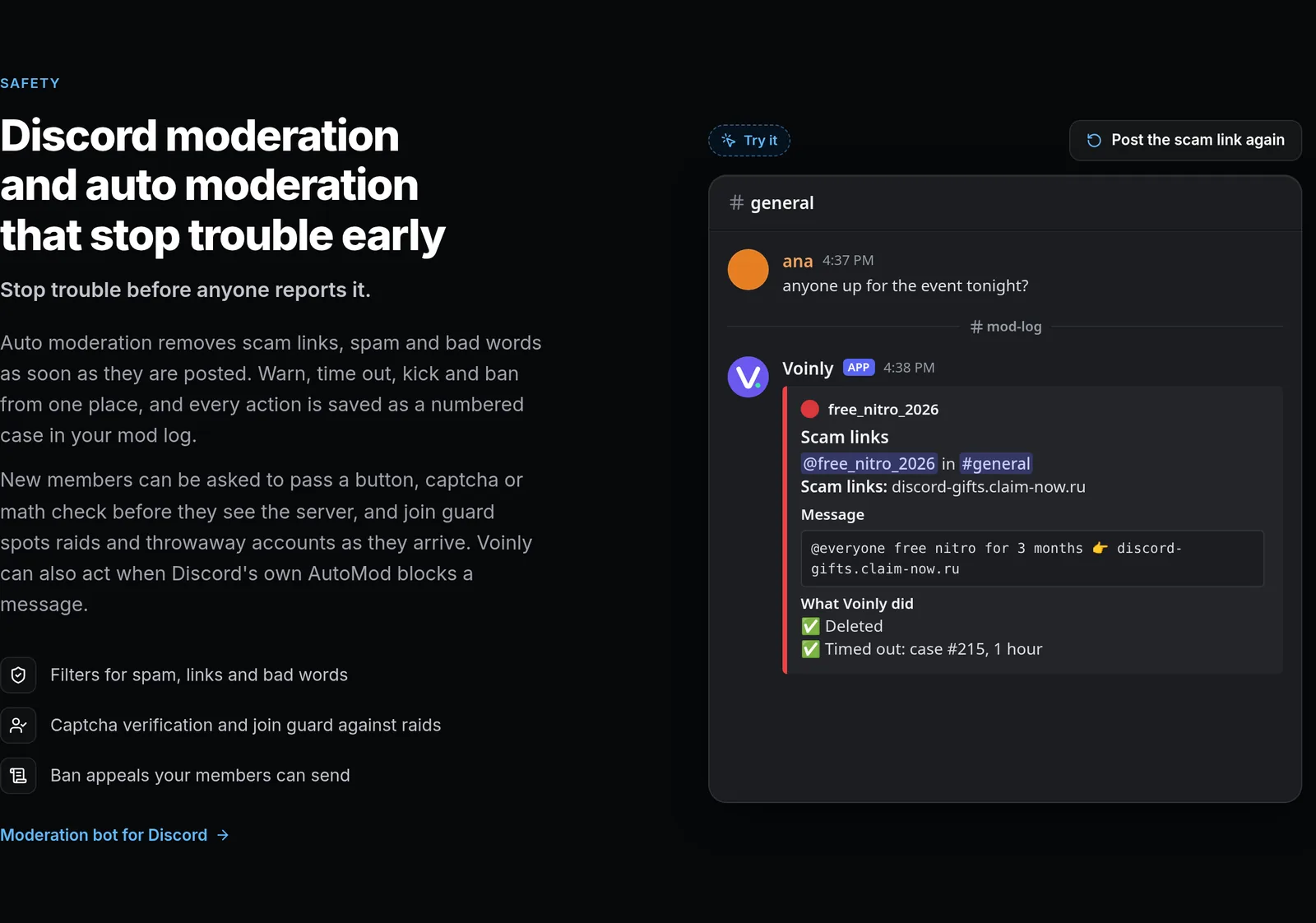
Each filter can delete the message, warn, time out, kick or ban, and log it. Warnings from auto moderation and from moderators all count toward Warning escalation. Turn on Check edited messages too, so nobody posts something clean and pastes the link in later.
The fastest setup is the recommended set
In the dashboard, open Auto moderation and press Turn on recommended. That switches on 11 filters most servers want, including Spam, Repeated messages, Channel spam, Mass mentions, Scam links, Server invites and Warning escalation.
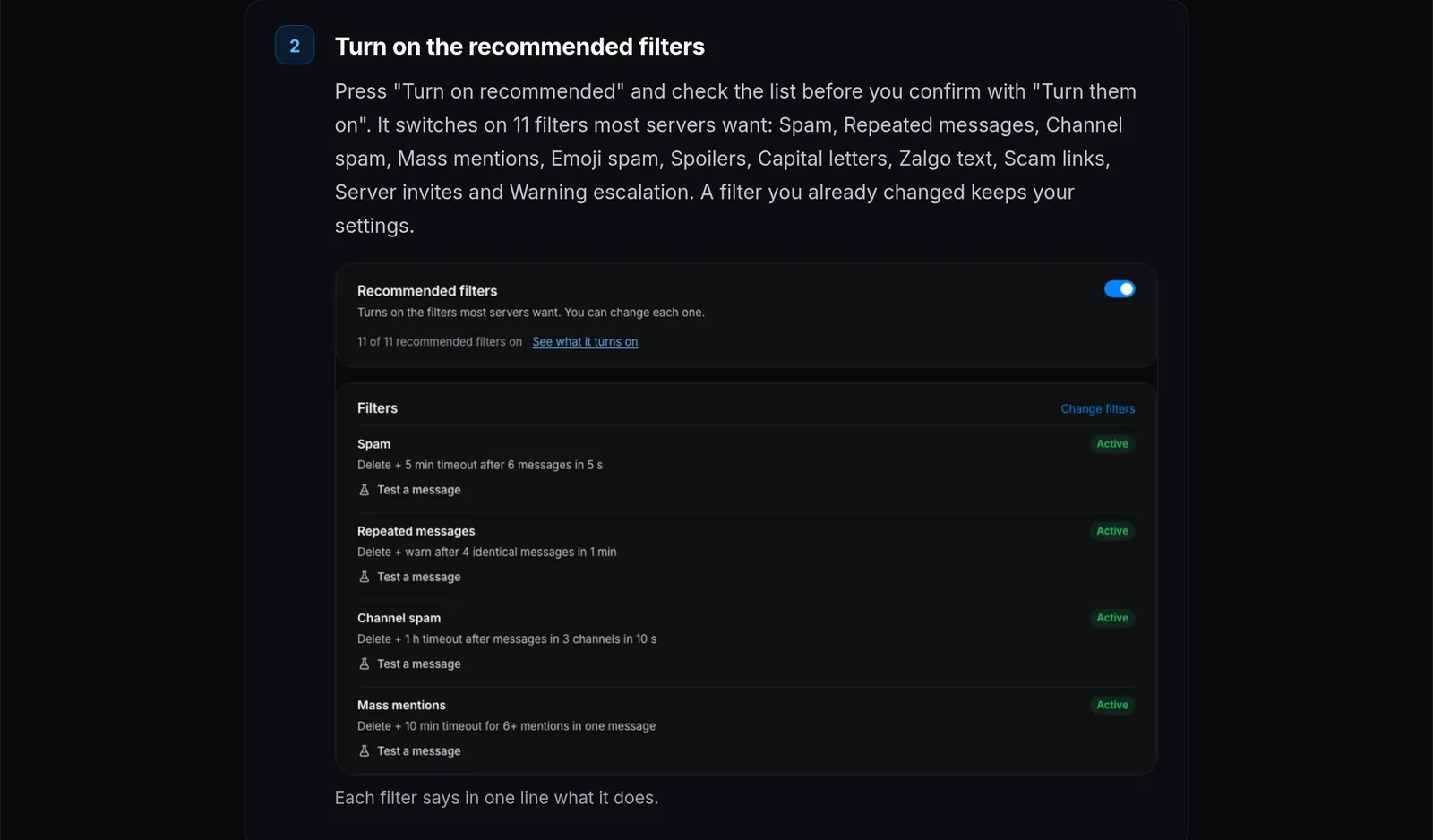
Voinly can also act on Discord's AutoMod, so a blocked keyword can be logged, warned or escalated. Test a sample with /automod test (nothing is deleted), check what is on with /automod status, and use the Activity tab to tune limits. Full walkthrough: how to set up AutoMod on Discord.
A bot sees the message as it is posted, then deletes it, so keep Discord AutoMod on for keywords that should never appear. If a timeout or ban does not land, it is usually role order or a missing permission. Voinly needs Manage Messages to delete, Moderate Members to time out, and Kick Members or Ban Members for those actions, and its role must sit above the member it acts on. See the roles guide if that is the blocker.
Step 5: Add a verification gate and raid protection
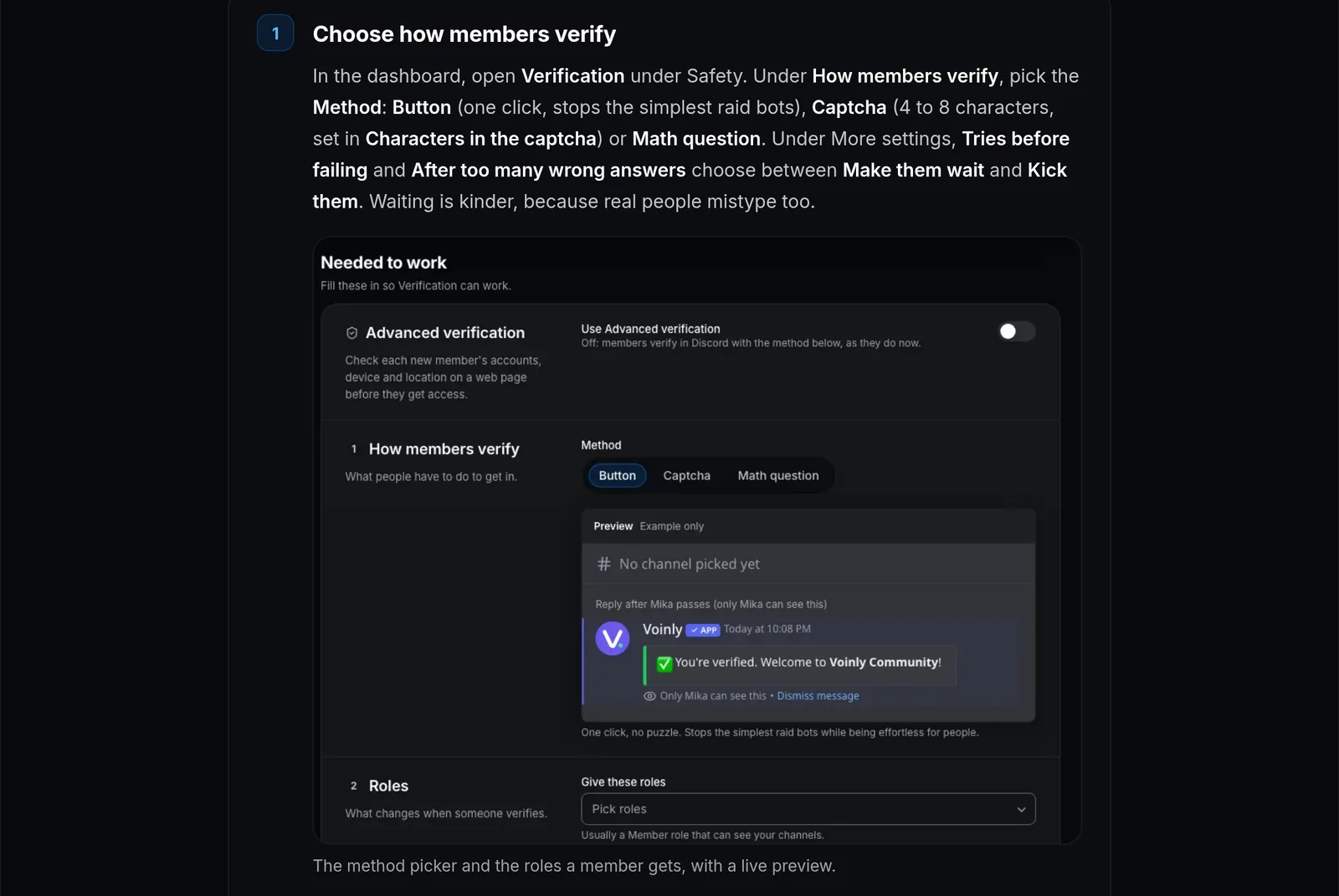
Link restrictions work best when a new joiner cannot see #general until they pass a simple check. Voinly's verification can ask for a button click, a captcha or a math question, then give a Member role (and optionally take away an Unverified role) so only then do your channels open up. Hide those channels from @everyone, leave one verify channel visible, and post the panel with /verifypanel. Test it with a second account. Details: verification guide.
That still leaves join floods
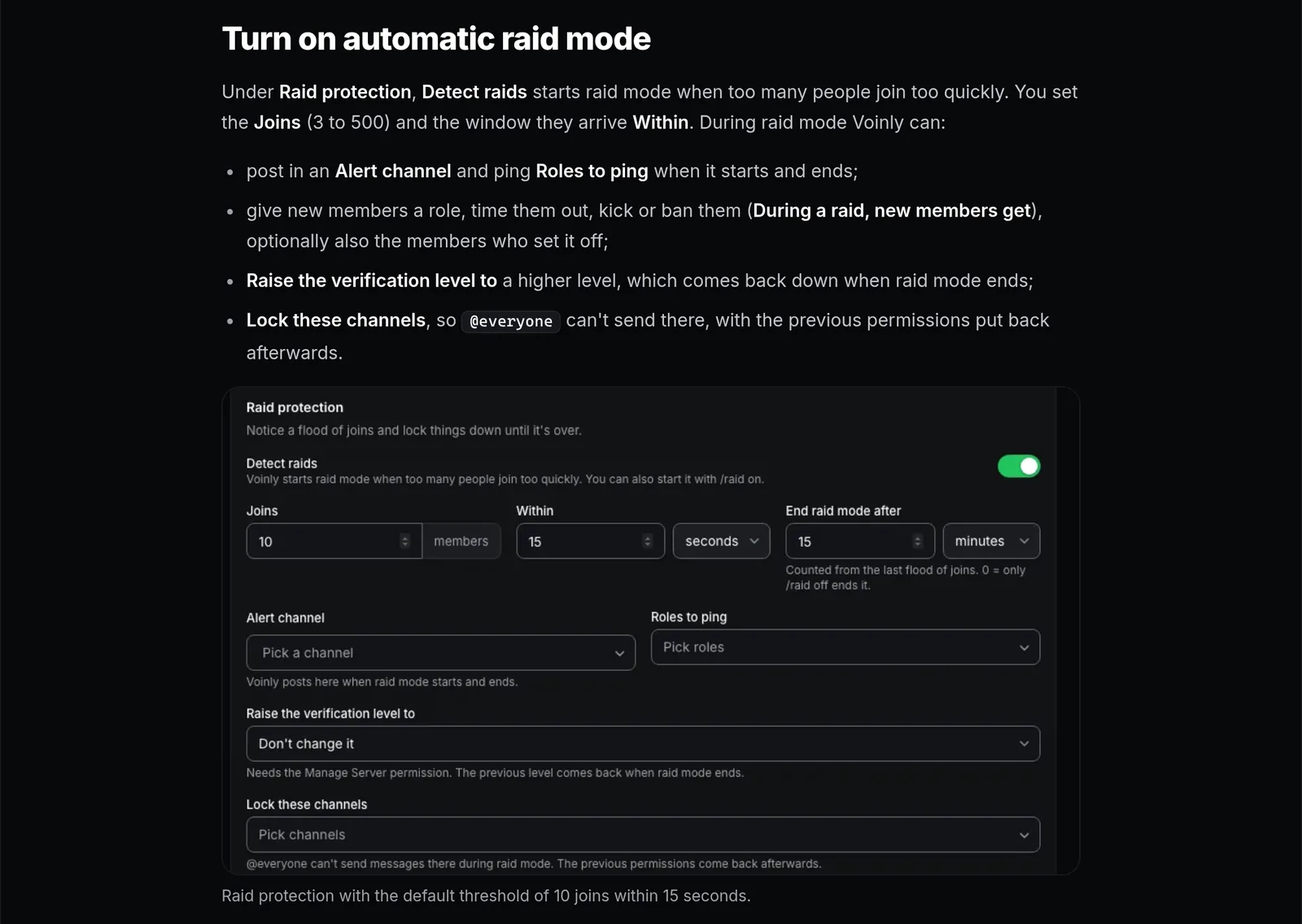
Join guard checks accounts as they arrive and can start raid mode when too many people join too quickly. The default threshold is 10 joins in 15 seconds. During raid mode Voinly can alert staff, act on new joins, raise the verification level, and lock channels so @everyone cannot send, then restore the previous settings when it ends. Use /raid on, /raid off and /raid status. Walkthrough: how to stop raids on Discord.
If a raid is already happening, pause or delete the invite they are using (look under Invites in Server Settings), run /raid on, then clean up with /purge and, if needed, /massban.
Step 6: What to do when a member is compromised
Act as if the account is hostile until the real person has it back. Waiting to be "sure" usually means more people clicked the link.
- Stop the account from posting. Time it out immediately. If it is still spreading the link faster than you can delete, kick or ban it and undo that later. A timeout is enough in most cases and is easier to reverse.
- Remove the messages. Delete what you can see, then use
/purgeto clear recent messages from that member, or filter by links. Voinly can purge up to 10,000 recent messages and filter by member, links, attachments or text. Do not click the URL to inspect it. - Warn your server. Post in announcements: do not click links from that account, Discord staff will never DM a login or a "free Nitro" page, and anyone who already clicked should change their password and enable MFA.
- Report it. Right-click (or long-press) the message and choose Report Message.
- Check what else they sent. Open your log channel and the audit log. Voinly Logging can include the original text of a deleted message and, with Keep deleted images on, the images. Set logging up before you need it. Guide: how to see deleted messages.
- Reach the real person somewhere else, if you can, and send them My Discord Account was Hacked or Compromised. They should reset the password, turn on MFA, open User Settings → Authorized Apps and deauthorize anything they do not recognize, and run a malware scan. If they are locked out, they should use Discord's official hacked-account form, not a "recovery" link someone DMs them.
- Let them back in once they have the account. Lift the timeout, or unban them, when you are confident they are in control again. If you use ban appeals, they can request that from a form.
If the compromised account had a staff role, take the role off until they recover, and review the audit log for bans, kicks, or channel and permission changes.
Setting up a new server?
Walk through the Discord server setup guide, then add Voinly and follow the docs. If a verification or member role will not assign, fix the role order with Discord bot can't give roles.
A 10-minute checklist
-
Turn on Discord AutoMod
Discord AutoMod is on: spam content, custom keywords for Nitro and gift phrasing, mention-spam limits
-
Set the verification level
Verification level is Medium or High on a public server
-
Stop new members embedding links
@everyone cannot embed links until they have a Member role
-
Hand out the Member role
A verification gate hands out that Member role
-
Turn on a scam-link filter
A scam-link filter is on, plus spam, repeated messages and server invites, with edited messages checked
-
Prepare raid protection
Raid protection can lock channels and alert staff during a join flood
-
Keep a private log
A private log channel records deletes, edits and mod actions
-
Agree the first moves
Staff know the first moves: timeout, purge, warn the server, report, then help the real person recover
Frequently asked questions
What do Discord Nitro scam links look like?
How do I stop scam links on Discord?
Is Discord's AutoMod enough to block phishing links?
What does a Discord anti-scam bot actually do?
What should I do if a trusted member posts a Nitro scam?
Will a scam-link filter block YouTube, Tenor or other normal links?
Is Voinly free?
Add Voinly to your server
Every Voinly module is free. The only paid extras are Custom bot and extra AI moderation scans (see pricing). Add it to Discord and set it up from the dashboard.
Add to Discord