


How to Stop Raids on Discord
Raids are floods of accounts that join together to spam, ping and scare people off. To stop raids, raise Discord's own safety settings, screen new accounts as they join, lock down automatically when joins spike, and filter spam and mass mentions. This guide walks through each layer, then what to do while a raid is going on.
Updated
How raids usually work
Most raids follow the same pattern: dozens of new or freshly made accounts join through a public invite within a minute, then post the same message, ping @everyone or as many people as they can, or drop scam links. The accounts often share traits: created on the same day, no profile picture, names like user_4821. Each layer below targets one of those traits, so even a raid that beats one layer meets the next.
Start with Discord's own settings
Discord gives every server some protection. Names and places change between Discord versions, so look in Server Settings under the safety or moderation section if a name below differs.
- Verification level. Set it to Medium (accounts older than 5 minutes) or High (also 10 minutes in your server). Throwaway accounts have to wait before they can post.
- Discord's AutoMod. Discord's built-in AutoMod can block keywords and mention spam before the message is posted. Some of its rules may need Community to be turned on.
- Pausing invites. Recent versions of Discord let you pause invites for a while, which stops anyone new from joining. Look for it under Invites in Server Settings.
- Role permissions. Take Mention @everyone, @here and All Roles away from
@everyone, and keep link and file permissions for trusted roles if you can.
Screen accounts as they join
Voinly's Join guard runs New member checks on everyone who joins, and each check you leave off is skipped:
- Minimum account age: accounts created more recently fail.
- Require a profile picture: members still on Discord's default avatar fail.
- Auto-generated usernames: patterns such as underscore and 3 or more digits (
user_043) or only numbers. - Suspicious names: words or wildcard patterns matched against the username and display name, ignoring case and look-alike letters.
- Accounts created on these days, Server tags and Block unverified bots.
Pick a gentle action first
Under What happens, the Action can be Only log it, Give a role, Time out, Kick or Ban. Time out (the default) or a quarantine role keeps a wrongly flagged member in the server, so you can let them in. Kick and ban also remove real people when a check misfires. Add trusted people and partner invites under Exceptions.
Turn on automatic raid mode
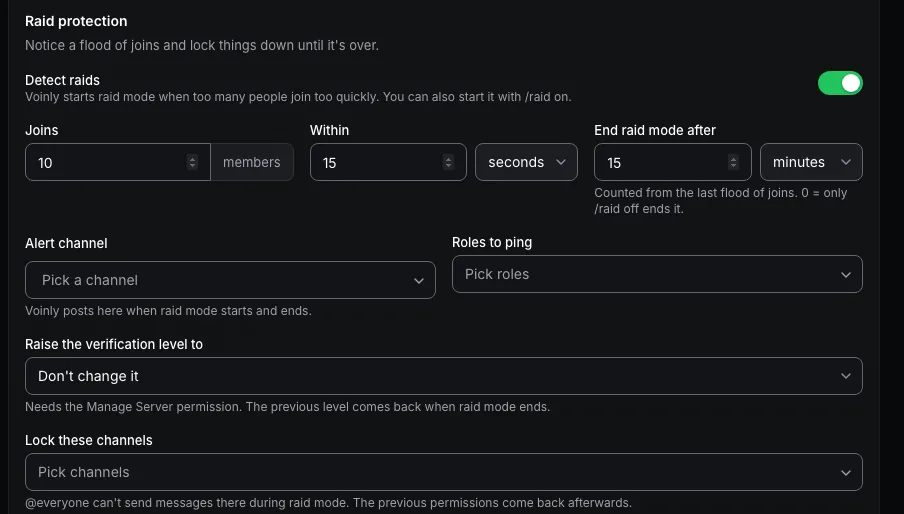
Under Raid protection, Detect raids starts raid mode when too many people join too quickly. You set the Joins (3 to 500) and the window they arrive Within. During raid mode Voinly can:
- post in an Alert channel and ping Roles to ping when it starts and ends;
- give new members a role, time them out, kick or ban them (During a raid, new members get), optionally also the members who set it off;
- Raise the verification level to a higher level, which comes back down when raid mode ends;
- Lock these channels, so
@everyonecan't send there, with the previous permissions put back afterwards.
Filter spam and mass mentions
Raiders who get in still have to post. In Auto moderation, turn on the Spam filter (too many messages too fast), Repeated messages, Channel spam (the same member posting across channels) and Mass mentions. Add Scam links and Server invites for the usual payloads. Each filter can delete, warn, time out, kick or ban, and log what it did. Check a message against your filters with /automod test.
Finally, a verification gate means raid accounts land in a single channel where they can't post. See the verification guide for the full setup.
What to do during a raid
- Lock down first. Run
/raid on [minutes] [reason]. It applies the same lockdown as automatic raid mode./raid statusshows what it changed. - Stop new joins. Pause your invites in Discord, or delete the invite the raid came through.
- Clean up.
/purgeremoves up to 10,000 messages at once and can filter by user./massbanbans up to 200 user IDs in one go. - End it.
/raid offrestores permissions and the verification level. If you set End raid mode after, it also ends on its own after the last flood of joins. - Review. Read the Join guard log and the Activity tab, and unban anyone caught by mistake with
/unban.
Troubleshooting raid protection
Raid mode didn't raise the verification level
Voinly needs the Manage Server permission for that. Channel locks need Manage Roles on those channels, and the Trusted invites check needs Manage Server to see which invite someone used.
Raid mode starts during busy events
A big announcement can bring many real joins at once. Raise Joins or shorten Within, and set the raid action to give a role rather than kick.
Set up raid protection with Voinly
-
Set Discord's verification level
In Server Settings, set the verification level to Medium or High and remove the
@everyonemention permission from regular roles. -
Turn on Join guard checks
Open Join guard under Safety. Set Minimum account age to a few days, turn on Require a profile picture, pick Auto-generated usernames patterns, and choose Time out or Give a role as the Action. Pick a Log channel.
-
Turn on Detect raids
Under Raid protection, keep the default 10 joins within 15 seconds or adjust them, pick an Alert channel, choose what new members get during a raid, raise the verification level and list the channels to lock.
-
Add spam and mention filters
Open Auto moderation and turn on Spam, Repeated messages, Channel spam, Mass mentions, Scam links and Server invites. Give each a log action so you can see what it caught.
-
Practise the plan
Make sure your moderators know
/raid onand/raid off. Running them once on a quiet day shows exactly what gets locked, and/raid statusconfirms it.
Anti-raid guide commands
| Command | What it does | Who can use it |
|---|---|---|
/raid on [minutes] [reason] | Start raid mode by hand: lock down and act on new joins. | Moderators |
/raid off | End raid mode and restore permissions. | Moderators |
/raid status | See whether raid mode is on and what it changed. | Moderators |
/automod status | See which filters are on and what they do. | Moderators |
/automod test <message> | Check which filters would catch a message, without acting on it. | Moderators |
/verify [member] | Start verification for yourself. Staff can name a member to verify them by hand. | Everyone |
/forceverify <member> [reason] | Verify a member by hand, skipping every check. | Staff: Timeout Members, Kick Members, Ban Members, Manage Messages or a moderator role |
/sendverify <member> | Send a member their verification link by DM and private thread. | Staff: Timeout Members, Kick Members, Ban Members, Manage Messages or a moderator role |
/verifypanel [channel] | Post or update the verification panel. Name a channel to move it there. | Server managers: Manage Server or a manager role |
/unverify <member> | Take a member's verified roles away so that they have to verify again. | Staff: Timeout Members, Kick Members, Ban Members, Manage Messages or a moderator role |
/verifyinfo <member> | Show a member's verification status, last result and linked accounts. | Staff: Timeout Members, Kick Members, Ban Members, Manage Messages or a moderator role |
/verifyunlink <member> [platform] | Stop matching a member to their linked accounts in this server. | Server managers: Manage Server or a manager role |
/verifyreset <member> | Clear a member's wait, tries, link and waiting review so they can start again. | Staff: Timeout Members, Kick Members, Ban Members, Manage Messages or a moderator role |
/verifyreview <member> <decision> [reason] | Approve or deny a member who is held for review. | Staff: Timeout Members, Kick Members, Ban Members, Manage Messages or a moderator role |
Frequently asked questions
What is the fastest way to stop a raid that is happening now?
/raid on to lock channels and act on new joins, pause your invites in Discord, then clean up with /purge and /massban. End it with /raid off.Will raid protection kick real members?
Does raid mode stay on forever?
/raid off to end it.Is Voinly's anti-raid protection free?
How do I stop raids on Discord?
/raid on, pause invites in Discord, then clean up. Voinly's raid protection is free.What is an anti-raid setup on Discord?
/raid off restores what raid mode changed.Can Discord stop a raid by itself?
How do I turn on raid protection?
Add Voinly to your server
Every Voinly module is free. The only paid extras are Custom bot and extra AI moderation scans (see pricing). Add it to Discord and set it up from the dashboard.
Add to Discord