
How to see and log deleted messages in Discord
Discord does not let anyone, admins included, read deleted messages after the fact. What you can do is log them: a logging bot copies messages it sees, and when one is deleted it posts the content to a private staff channel. This guide explains what Discord shows, what it doesn't, and how to set up deleted messages logging with Voinly.
Updated
What Discord shows on its own
When a message is deleted, Discord removes it for everyone. Members see nothing at all, not even a placeholder. There is no setting, role or permission that brings the text back.
Server staff with View Audit Log can open Server Settings, then Audit Log. It lists some deletions, but with clear limits:
- It records a deletion only when someone deleted another person's message, such as a moderator removing spam. A member deleting their own message leaves no entry.
- It shows who deleted, whose message it was and the channel, but never the content.
- Entries are grouped and kept only for a limited time.
The honest limit: nothing from before
A logging bot can only copy messages it has seen. It can't show messages deleted before it was added to your server, and no bot or website can. Tools that claim to recover old deleted messages are at best guessing and at worst a scam asking for your login. Set logging up now, and every deletion from this point on is recorded.
How Voinly logs deleted messages
Voinly keeps a short-lived copy of recent messages in its memory, a limited number per server, not in a database. When a message is deleted, it posts a Message deleted entry in your log channel with the channel, the author, when it was sent, the text and the attachments. Bulk deletes (purges) come as a text file with every deleted message.
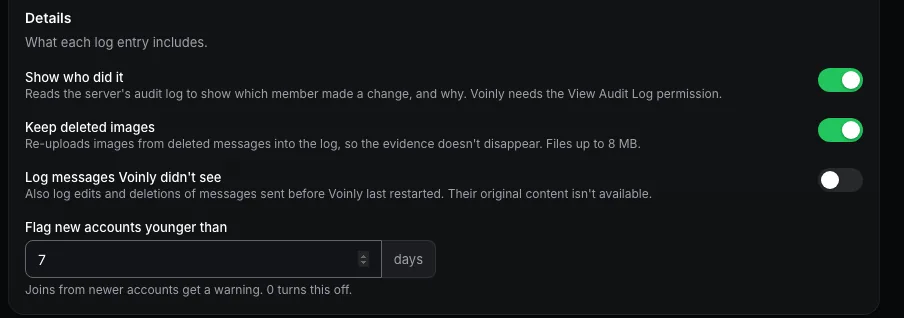
Because that copy lives in memory, a message Voinly never saw, or one sent before Voinly last restarted, has no copy. That is what the setting Log messages Voinly didn't see is for: it also logs edits and deletions of messages sent before Voinly last restarted, but their original content isn't available. The entry says a message was deleted, in which channel and when it was sent, so you can still match it with the audit log.
Keeping deleted images
Discord removes a deleted message's attachments too, so a link to the image stops working. With Keep deleted images on, Voinly re-uploads images from deleted messages into the log entry, so the evidence doesn't disappear. Files up to 8 MB are kept.
Who deleted it
With Show who did it on, Voinly reads the audit log and names the member who deleted someone else's message. It needs the View Audit Log permission. When the author deleted their own message, Discord records nobody, so the entry shows only the author.
Edits, purges and pins
Deleted messages are only half the story. Someone who wants to hide what they said often edits the message instead, so turn on Edited messages too: the log shows the text before and after the edit. Bulk deletes covers purges by moderators or bots, with every removed message in an attached text file, and Pins records messages pinned or unpinned.
Privacy: log responsibly
A message log holds things people chose to remove, sometimes by mistake and sometimes because they shared too much. Treat it as staff evidence, not gossip:
- Keep the log channel private to moderators. The channel picker's help says so for a reason.
- Say in your rules that messages are logged for moderation.
- Use Ignore to leave out channels where logging isn't fair, such as a venting channel, and roles or users that shouldn't be logged.
- Read Voinly's privacy policy for what Voinly stores and for how long.
Troubleshooting deleted message logs
The log says the content isn't available
Voinly hadn't seen that message, usually because it was sent before Voinly joined or before it last restarted, or because it was very old. New messages are logged in full.
Nothing is logged in one channel
Voinly needs View Channel there to see messages, and the channel must not be in the Ignore list. Bots are skipped while Ignore bots is on.
Log deleted messages with Voinly
-
Create a private log channel
Make a text channel such as
#message-logsthat only moderators can see, and let Voinly view it and send messages there. -
Pick the channel in Logging
In the dashboard, open Logging and pick the channel under All logs go to. To send message logs somewhere separate, turn on Use a different channel for each category under More settings and set the Message logs channel.
-
Choose the message events
Under Message logs, keep Deleted messages on (content, attachments and who deleted it when Discord tells us), and choose Edited messages, Bulk deletes and Pins.
-
Set the details and turn it on
Under Details, keep Keep deleted images and Show who did it on, and decide on Log messages Voinly didn't see. Press Turn on Logging, then Send test entries to log channels to check everything arrives.
Frequently asked questions
Can I see messages that were deleted before I added a bot?
Can server admins see deleted messages in Discord?
Does Voinly log edited messages too?
Is message logging free?
Add Voinly to your server
Every Voinly module is free. The only paid extras are Custom bot and extra AI moderation scans (see pricing). Add it to Discord and set it up from the dashboard.
Add to Discord