
How to set up Discord AutoMod
Discord AutoMod is the built-in filter in Server Settings. To set up automod in Discord, start there, then add a Discord moderation bot for the filters it doesn't have. Voinly's automod adds spam, scam link, capital letter and repeated message filters, warnings that escalate, and one switch that turns on a recommended set, all free.
Updated
Step one: Discord's built-in AutoMod
Discord AutoMod is in Server Settings, in the safety section (Discord has moved it around over the years). Its rules run inside Discord, so a blocked message is never posted at all. The rule types are:
- Custom words: block words and phrases you list, with wildcards and, for advanced users, regex.
- Mention spam: block messages that mention too many people or roles.
- Suspected spam content, and commonly flagged words, which Discord maintains for you. Some of these only appear in Community servers.
What it can't do
When a rule matches, Discord can block the message, send an alert to a channel and time the member out. That's a good base, and it costs nothing. But Discord's AutoMod doesn't count warnings, so a member who keeps breaking rules is treated the same the tenth time as the first. It has no filter for messages sent too fast, repeated messages, capital letters, emoji walls or zalgo text, no list of known scam sites, and no case history. Keep it on for words and mention spam, and add a bot for the rest.
Quick steps for automod
Automod is the part of a Discord moderation bot that acts on a message by itself. These four steps get a basic setup running. The sections below explain what Discord already does, and what Voinly adds on top.
- Keep Discord's built-in AutoMod on for custom words and mention spam.
- Add Voinly, open Auto moderation, and turn on the recommended filters.
- Add the words and links you want caught, and pick a private log channel.
- Run
/automod testwith a sample message. Nothing is deleted or sent.
The filters Voinly adds
Voinly's Auto moderation has 17 filters in three groups:
| Group | Filters |
|---|---|
| Spam and flooding | Spam (messages too fast), Repeated messages, Channel spam, Mass mentions, Attachment spam, Emoji spam, Spoilers, Walls of text, Capital letters, Zalgo text, Polls |
| Content | Blocked words, Links, Scam links, Server invites, Special channels |
| Escalation | Warning escalation |
What a filter can do
Each filter runs up to 12 actions in order: delete the message, DM the member, reply in the channel, add reactions, add or remove roles, warn, time out, kick, ban, report to moderators, or log it. Warnings, timeouts, kicks and bans become numbered cases in Moderation, with the mod log and DMs that go with them.
Blocked words that are hard to dodge
The Blocked words filter takes up to 1,000 words and phrases, plus up to 25 regex patterns for advanced users. Leave "Catch disguised words" on: it also catches look-alike letters, accents, h4ck3r spelling and s p a c e d letters, which is how people usually get around Discord's word list. Keep Check edited messages on so a word can't be added later by editing.
Escalate repeat offenders
Warning escalation punishes members who collect too many warnings, from moderators or from automod. The recommended setting times out a member for 1 hour at 3 warnings within a day. Add a second rule for a kick at 5, and so on. This is the part Discord's AutoMod can't do, and it lets small filters like Repeated messages or Server invites start with a warning instead of a punishment.
Add AI moderation for what word lists miss
AI moderation (beta) reads new messages and flags ones that break your rules even when they use no blocked word, such as harassment or threats. Pick the categories under What to look for, write up to 5 rules of your own, and set the Strictness. Start with Only report it and send unsure messages to a Staff channel, read Activity for a few days, then let it act. When the AI isn't sure, Voinly never deletes or punishes. Free servers get 1,000 checks a day and 30,000 a month, and extra AI scans, sold as one-time packs, keep it going past them.
How to set up automod with Voinly
-
Turn on Auto moderation
Add Voinly to your server, log in at voinly.com with Discord, pick the server and open Auto moderation. Press "Turn on Auto moderation". Voinly needs Manage Messages to delete, and Timeout Members, Kick Members or Ban Members for those actions.
-
Turn on the recommended filters
Press "Turn on recommended" and check the list before you confirm with "Turn them on". It switches on 11 filters most servers want: Spam, Repeated messages, Channel spam, Mass mentions, Emoji spam, Spoilers, Capital letters, Zalgo text, Scam links, Server invites and Warning escalation. A filter you already changed keeps your settings.
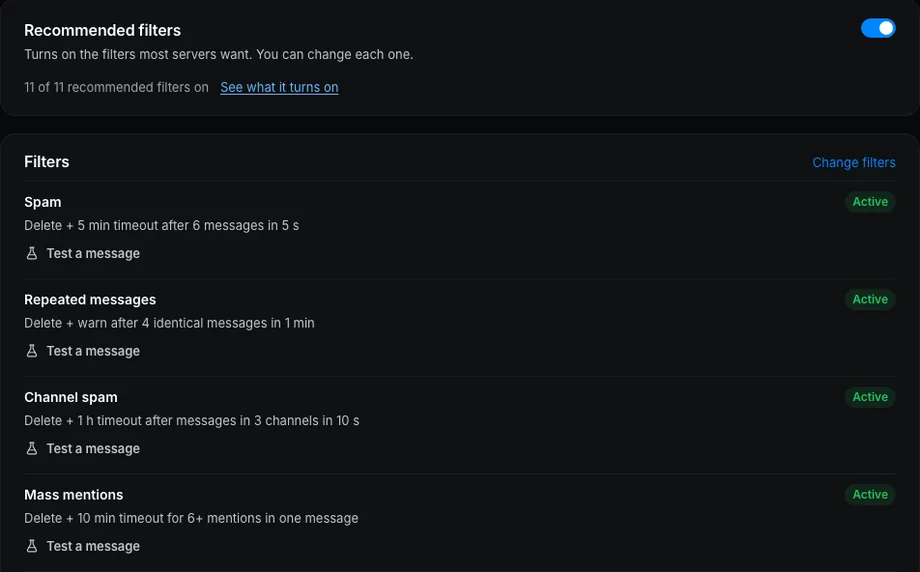
Each filter says in one line what it does. -
Add your words and links
Press "Change filters" to open Advanced auto moderation. Turn on Blocked words and add your list. Turn on Links if you want to limit websites: it starts with an allow list of common safe sites (YouTube, Twitch, GitHub, Wikipedia and more), or switch it to a block list. Scam links is separate and only catches fake Discord, Nitro and Steam sites, so normal links are never caught.
-
Choose who is checked and where it logs
Under Who is checked, keep Ignore moderators and managers and Ignore bots and webhooks on, and add Ignored roles or Ignored channels, such as a channel where links are fine. Pick a private Log channel so every filter with the Log it action posts the member, the reason, the message and what was done.
-
Act on Discord's AutoMod too
Open Discord's built-in rules and turn on Act on Discord's auto moderation. When Discord blocks a message, Voinly can add Also do this: Log it, Warn, Time out, Kick, Ban or DM the member. Use Only for these Discord rules to limit it to some of them. Now a blocked word also counts toward Warning escalation.
-
Test before members find the gaps
Press "Test a message" under any filter, or run
/automod testwith a message in Discord. Voinly says which filters would catch it and nothing is deleted or sent./automod statuslists which filters are on. The Activity tab shows what was caught, and when.
Automod guide commands
| Command | What it does | Who can use it |
|---|---|---|
/automod status | See which filters are on and what they do. | Moderators |
/automod test <message> | Check which filters would catch a message, without acting on it. | Moderators |
Frequently asked questions
What is automod on Discord?
What is a Discord moderation bot?
How do I turn automod on?
Should I use Discord's AutoMod or a bot?
Automod deleted a message it shouldn't have
/automod test shows the result before you save.Automod doesn't punish anyone
Can automod also clean up thread notices?
Is AI moderation available?
Is it free?
Add Voinly to your server
Every Voinly module is free. The only paid extras are Custom bot and extra AI moderation scans (see pricing). Add it to Discord and set it up from the dashboard.
Add to Discord