
How to set up a Discord moderation bot and a Discord automod setup
A Discord moderation bot records warnings, timeouts and bans, and automod handles messages that already break a rule. To set up Discord moderation, create a moderator role first. A Discord automod setup belongs in the same pass: Discord's own AutoMod blocks some messages before anyone sees them, and Voinly adds spam, scam link and word filters plus a warning count. Cases, a mod log and temporary bans are free.
Updated
Start with a moderator role
Open Server Settings → Roles, press Create Role and name it Moderator. Give it only what moderators need: Timeout Members, Kick Members, Ban Members, Manage Messages and, if they handle channels, Manage Channels. Leave Administrator off: it skips every channel permission and can't be limited.
Then check the role order. Discord only lets someone act on members whose highest role is below their own, and the same goes for bots. Put the Moderator role above regular members, and drag Voinly's role above the roles it should be able to time out, kick or ban.
What Discord's own moderation tools do
Without a bot, a moderator right-clicks a member (long-press on mobile) and picks Timeout, Kick or Ban. A timeout stops the member from talking and joining voice for up to 28 days. A ban can also delete up to 7 days of their messages. Every action shows up in the server's Audit Log, which only staff with the permission to view it can read.
Where it falls short
- There are no warnings, so there is nothing between "please stop" and a timeout.
- There is no per-member history with numbered cases you can refer back to or appeal.
- Bans can't end on their own. A temporary ban means someone has to remember to unban.
- Members aren't told the reason, and other moderators can't see it in a channel.
- Clearing a raid's messages or banning dozens of accounts is slow by hand.
Quick steps for a Discord moderation bot
Automod and staff commands are the two halves of the same setup. Do these before you invite a crowd. The automod guide is the full filter list.
- Create a Moderator role with Timeout Members, Kick Members, Ban Members and Manage Messages. Leave Administrator off.
- Put Voinly's role above the members it should be able to time out, kick or ban.
- Open Moderation, pick a private mod log channel, and turn on Require a reason.
- Open Auto moderation and turn on the recommended filters, so automod handles spam before staff do.
What a moderation bot adds
Voinly's Moderation module is on by default. Every warn, timeout, kick and ban gets a case number and is saved on the Cases tab, where you can search and filter by type or state. Moderators run commands in Discord, and members can be DMed what happened, with a link to your appeal form if you use ban appeals.
| Command | What it does |
|---|---|
/warn | Warn a member and record it as a case |
/timeout | Time out a member, with lengths like 10m, 2h, 7d or perm (alias mute) |
/ban | Ban anyone, even if they're not in the server; add a duration for a temporary ban |
/cases | Browse the case history for a member or the whole server (alias modlogs) |
/case close | Close a case; closing a ban or timeout lifts it |
/purge | Bulk delete up to 10,000 recent messages, filtered by member, bots, humans, links, attachments, embeds or text |
/lock | Stop members from talking in a channel; /lock all locks your chosen list |
/massban | Ban up to 200 accounts at once by ID, for example after a raid |
Discord automod setup next to moderation
Discord moderation is what people do to members: warnings, timeouts, kicks and bans. Automod is what happens to a message that already breaks a rule. Use both. Discord ships its own AutoMod in Server Settings (Discord has moved that screen over the years). Its rules run inside Discord, so a blocked message is never posted. The usual rule types are custom words, mention spam, and content Discord flags as spam. When a rule matches, Discord can block the message, alert a channel and time the member out.
That layer does not keep a warning count, so the tenth offense is treated like the first. It also has no filter for messages sent too fast, repeated messages, scam sites or a case history. Leave it on, and add Voinly's Auto moderation for the rest. The full filter list is in how to set up automod in Discord.
What Voinly's auto moderation adds
Auto moderation is a separate module from Moderation. Its filters cover spam (messages sent too fast), repeated messages, blocked words, links, scam links and invites to other servers, plus warning escalation for members who collect too many warnings. A filter can delete the message, warn, time out, kick, ban or log it, among other actions. Warnings, timeouts, kicks and bans go through the moderation engine, so they get case numbers, a mod log entry and the same member DM as a moderator's command.
The two systems meet on Discord's own blocks. In Auto moderation, turn on "Act on Discord's auto moderation". Discord has already blocked the message. "Also do this" can then log it, warn, time out, kick, ban or DM the member. "Only for these Discord rules" limits that to rule names you set in Discord; leave it empty to act on all of them. A warning from that action counts toward warning escalation.
Verification and raid protection
Moderation and automod act after someone can already reach your channels. A public server also needs a gate, and a response when many accounts join at once.
Verification hides channels from newcomers until they pass a button, a captcha or a math question and receive a role. Discord's own verification level is a different switch: it only decides who may send messages, based on email, account age or a phone number. Walkthrough: how to verify a member.
Join Guard checks accounts as they join, for example a minimum account age, a missing profile picture or an auto-generated username. When too many people join at once, raid mode can lock chosen channels and time out, kick or ban the new accounts. During a raid that is already inside, moderators still use the lock, purge and mass ban commands above. Walkthrough: how to stop raids.
Rules that make moderation fair
- Write your rules down in one channel and number them, so a reason can say "rule 3".
- Agree on steps: for example a warning, then a 1 hour timeout, then a ban for repeat offenders.
- Turn on Require a reason so every case says why, and add Predefined reasons for the common ones.
- Keep Show which moderator acted off, the default, so members can't take it out on one person.
- Let auto moderation handle spam and blocked words, so moderators deal with people, not floods.
- Private reports belong in a ticket, not a public channel. The Discord ticket setup guide covers the panel.
How to set up moderation with Voinly
-
Pick moderator roles
Add Voinly to your server and open the dashboard. Members with Timeout, Kick or Ban Members can already use the matching commands. To let a role moderate through Voinly without those Discord permissions, add it under Moderator roles in Bot settings.
-
Choose a mod log channel
Open Moderation and pick a private Mod log channel. Every warn, timeout, kick, ban and case change is posted there with its case number. Decide whether Show a public confirmation in the channel stays on: when it is off, only the moderator sees the reply.
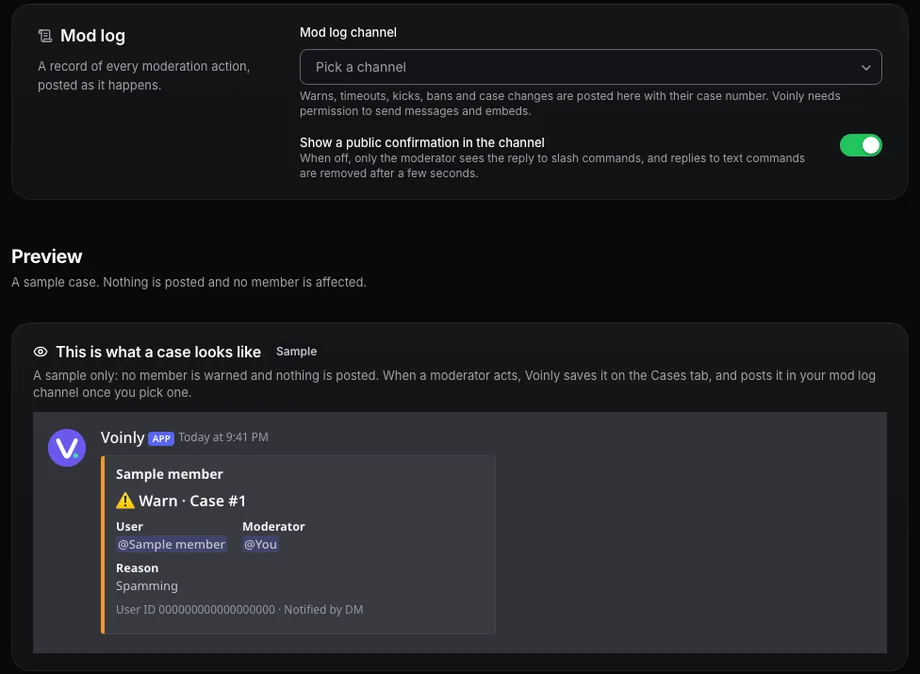
The preview shows a sample case. Nothing is posted until a moderator acts. -
Set reasons and default lengths
Under Reasons, turn on Require a reason and add up to 25 Predefined reasons, each with a Short name, so
!warn @member spamfills in the full reason. In Punish settings, set the Default timeout length, the Default ban length (0 means a permanent ban), Delete messages when banning and Warnings expire after. -
Decide what members are told
Under Member DMs, keep User notifications on and choose which actions DM the member. DMs are sent before a kick or ban, while Voinly can still reach them. Add
{appeal_url}to the ban message to link your appeal form. Under Privacy, choose whether members see the case number, reason, length and moderator. -
Protect your staff
Add your staff roles to Immune roles so they can't be warned, timed out, kicked or banned through Voinly, including by automod. Keep Confirm punishment when recent case exists on so two moderators don't punish the same member twice in a moment.
-
Try it and set up cleanup tools
Run
/warnon a test account and check the mod log, the DM and the Cases tab. Then pick Channels to lock with /lock all for raids, and Roles that keep access when locked./purgeskips pinned messages unless Purge deletes pinned messages is on.
Moderation guide commands
| Command | What it does | Who can use it |
|---|---|---|
/warn <member> [reason] | Warn a member and record it as a case. | Moderate Members |
/timeout <member> [duration] [reason] | Time out a member (alias: mute). Durations like 10m, 2h, 7d or perm. | Moderate Members |
/untimeout <member> [reason] | Lift a timeout or mute (alias: unmute). | Moderate Members |
/kick <member> [reason] | Remove a member from the server. | Kick Members |
/ban <user> [duration] [reason] | Ban anyone, even if they're not in the server. Add a duration for a temporary ban. | Ban Members |
/softban <user> [reason] | Ban and instantly unban to wipe their recent messages. | Ban Members |
/unban <user> [reason] | Lift a ban. | Ban Members |
/massban <user IDs> [reason] | Ban up to 200 users at once by ID, e.g. after a raid. | Ban Members |
/note <user> <text> | Add a private note to someone's case history. | Moderate Members |
/warnings <user> | List someone's active warnings (alias: warns). | Moderate Members |
/unwarn <user> [reason] | Clear all of someone's active warnings. | Moderate Members |
/case view <number> | Show one case. | Moderate Members |
/case reason <number> <reason> | Change a case's reason. The mod log is updated too. | Moderate Members |
/case close <number> [reason] | Close a case. Closing a ban or timeout lifts it. | Moderate Members |
/case delete <number> | Delete a case from the history. | Manage Server |
/cases [user] | Browse the case history for someone or the whole server (alias: modlogs). | Moderate Members |
/purge <count> [user] [type] [contains] [after] | Bulk-delete up to 10,000 recent messages, with filters. | Manage Messages |
/slowmode <duration|off> [channel] | Set how long members wait between messages. | Manage Channels |
/lock [channel] [reason] | Stop members from talking in a channel. /lock all locks your chosen channels. | Manage Channels |
/unlock [channel] [reason] | Undo a lock and restore the previous permissions. | Manage Channels |
/lock all [reason] | Lock every channel on your list, or every public channel if the list is empty (text: lockall). | Manage Channels |
/unlock all [reason] | Unlock everything that /lock all locked (text: unlockall). | Manage Channels |
/nick <member> [nickname] | Change a member's nickname, or reset it. | Manage Nicknames |
Frequently asked questions
Can I give someone a temporary ban?
/ban @member 7d spamming, and Voinly unbans them when it ends. A ban works even on someone who already left the server. Set a Default ban length if most bans in your server are temporary.How do I see a member's warnings and past punishments?
/warnings lists someone's active warnings and /cases shows their whole case history. The dashboard's Cases tab lets you search by case, user or reason. /case reason fixes a reason and /unwarn clears warnings.Can I time out a member for longer than 28 days?
Why does Voinly say it can't act on a member?
Is moderation free?
What is a Discord moderation bot?
What is a Discord automod setup?
How do verification and raids fit with Discord moderation?
Add Voinly to your server
Every Voinly module is free. The only paid extras are Custom bot and extra AI moderation scans (see pricing). Add it to Discord and set it up from the dashboard.
Add to Discord