
Discord Member Count Bot: Free Member Tracker
Voinly is a free Discord member count bot and member tracker. It renames voice channels so they show live numbers, such as Members: 1,234 or how many people are boosting. Members see the server growing without a command, and nobody can join the counter channels. Names, permissions and how often a name can change are in the Discord member count channel guide.
Up to 10 counters, each in its own channel
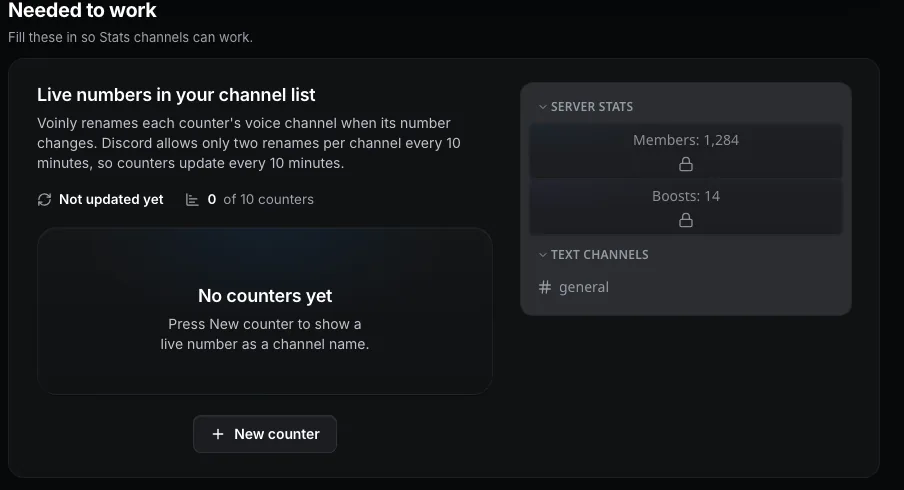
A counter is a voice channel whose name shows a number. Each server can run up to 10 counters. Pick an existing voice channel, or press Create for me and Voinly makes one. Counters are voice channels because they sit neatly in the channel list and can't receive messages.
Track member count
To track member count, add a counter and leave it on. The channel name is the member tracker: it lists the member count in the sidebar for everyone, with no command. Use /membercount when you want to list member count in chat instead, and /stats list when you want each counter's current value.
Names, where to put the channel, and how to stop people joining it are in the Discord member count channel guide.
Use Voinly as a member tracker
Use Voinly as a member tracker when you want a live member count in the channel list, plus a record of joins and leaves. The count is a voice channel whose name shows the number, such as Members: 1,234. Discord allows only two renames per channel every 10 minutes, so Voinly checks every 10 minutes and renames the channel only when the number changed. The same counters can show humans, bots, boosts or members with a role.
The channel shows the size of the server. Join and leave tracking sits beside that number. Welcome messages greet a new member and can post a leave message when someone leaves, is kicked or is banned. The Discord invite tracker shows which member invited each new person, and how many of those people stayed or left. Logging writes each join and leave into a staff channel. These modules are listed on the Voinly homepage.
What a counter can show
Each counter shows one of these numbers:
- Members: total members, humans only, or bots only.
- Boosts: server boosts, boost level and members boosting.
- Members with a role: for example how many Verified or Subscriber members you have.
- Members in voice right now.
- Server size: roles, channels, text channels, voice channels and categories.
- Emojis and stickers.
Your own channel names and number style
Each counter has a name template. {count} is the number and {name} the counter's name, like Members or the role's name. Leave it empty for names like Members: 1,234, or write your own, such as 👥 {count} gamers.
Pick the number style that fits: full (1,234), compact (1.2k) or plain (1234). Compact numbers round down, so a counter never claims more members than you have.
Counter setups that work well
- Growth at a glance: Total members and Members boosting at the top of the channel list.
- Real people only: Humans next to Bots, so bots don't make the member count look bigger than your community.
- A role counter: members with your Verified or Subscriber role, to see how many people finished onboarding.
- Who is around: Members in voice on a gaming server, refreshed every 10 minutes, so people can tell whether anyone is on.
Display-only channels
With Channel access on, Voinly denies Connect for @everyone on counter channels, so members can see them but can't join them. This needs the Manage Roles permission. Turn it off if you would rather manage the channel permissions yourself.
How often the member count updates
Discord limits how often a channel's name can change: two renames per channel every 10 minutes. That is why no bot can show a member count that changes the second someone joins. Voinly checks your counters every 10 minutes and only renames a channel when its number really changed, which keeps it inside the limit. If Discord still holds a rename back, Voinly pauses that channel and tries again later instead of hammering Discord.
Need it now? /stats refresh updates every counter at once, and /stats list shows each counter, its value and when it updates next. For a one-off number in chat, everyone can use /membercount.
Set up the member count bot in 4 steps
-
Open Stats channels
Add Voinly, open the dashboard and go to Stats channels.
-
Add a counter
Under Counters, press New counter and choose what to count, such as Total members.
-
Pick or create the channel
Choose a voice channel, or press Create for me. Then drag the channel to the top of your channel list in Discord.
-
Name it and save
Write a channel name with
{count}, pick a number style and save. Run/stats refreshto see it update right away. The Discord member count channel guide covers templates and permissions in detail.
Member count bot commands
| Command | What it does | Who can use it |
|---|---|---|
/stats refresh | Update every stats channel now instead of waiting. | Manage Server |
/stats list | Show each counter, its value and when it updates next. | Manage Server |
Frequently asked questions
Is the member count bot free?
What is a Discord member count bot?
Members: 1,234, and /membercount can list member count in chat. The Discord member count channel guide covers the name, who can see the channel, and how often Discord lets it change.How do I track member count?
/membercount lists the member count in chat when you want it once. The Discord member count channel guide shows where to put the channel.Is Voinly a member tracker?
Members: 1,234. For who invited each member, and how many stayed or left, follow the Discord invite tracker guide. A leave message is set with welcome messages, and logging records each join and leave for staff.Can a member tracker show joins and leaves?
Why doesn't my member count update instantly?
/stats refresh to update right away.Can I count members with a certain role?
Can members join the counter channels?
Can I show the count as 1.2k?
Add Voinly to your server
Every Voinly module is free. The only paid extras are Custom bot and extra AI moderation scans (see pricing). Add it to Discord and set it up from the dashboard.
Add to Discord