
How to make an embed in Discord, with or without code
To make an embed in Discord you need a bot or a webhook, because normal accounts can't send one. With Voinly you build the embed in the dashboard with a live Discord-style preview, add buttons if you like, and post it to any channel for free. No code and no JSON needed.
Updated
What an embed is
An embed is the boxed card under a message, with a colored stripe on the left. It can hold an author line, a title that can be a link, a description, up to 25 fields, a thumbnail, a large image, a footer and a timestamp. Servers use embeds for rules, announcements, role menus, event posts and anything that should look tidier than plain text.
Discord's own limits apply to every bot: a message holds up to 10 embeds, a title up to 256 characters and a description up to 4,096. The editor counts the characters for you.
Can you make an embed without a bot?
Not from a normal account. Discord only shows embeds sent by bots and webhooks, plus the automatic link previews it makes for websites. What you can do without a bot is format plain text: Discord's markdown supports headings with #, bold and italic, bullet lists, quotes, code blocks and masked links like [our site](https://…). For a short rules post that may be enough.
The other built-in route is a webhook. In a channel's Edit Channel settings, under Integrations, you can create a webhook and copy its URL. A webhook can post embeds, but Discord gives you no editor for them: you have to send JSON to that URL with code or an outside tool, and anyone who gets the URL can post as it. A bot with an editor is simpler and safer for most servers.
Three ways to post an embed with Voinly
| Way | Best for |
|---|---|
| The dashboard editor (Messages) | Embeds you want to get exactly right, reuse, edit later or add buttons to. Saved as a template. |
/embed | A quick one-off embed from Discord: a short form with a title, description, color and image. |
/send | Posting a saved template from Discord, for example the same announcement layout every week. |
Embeds or Components V2?
Each template has a layout, which you change under "Advanced" in the editor. Classic is message text, embeds and rows of buttons, the format most servers know. Components V2 is Discord's newer layout that builds the whole message from containers, sections, images and separators. This guide uses Classic, because that is what an embed is. You can switch back and forth: Voinly keeps your other layout so nothing is lost.
Tips for embeds that people read
- Keep one idea per embed. A rules embed and a links embed read better than one long card.
- Use fields for short facts side by side, like date, time and host for an event.
- Pick one color for each kind of post (announcements, rules, events) so members learn them.
- Put the most important line in the title. Many members only read the title on their phone.
- Use variables such as
{server}or{user}where it helps. The editor's Variables button lists all of them, and the preview fills in sample values. - If the same card should appear when someone types a command, use a custom command. The Discord custom commands guide shows how.
How to make an embed with Voinly
-
Open Messages and create a template
Add Voinly to your server, log in at voinly.com with Discord, pick the server and open Messages. Press "New template" and give it a Name, such as Server rules. Messages is always on, and you can keep up to 100 templates.
-
Add the embed
Press "Add an embed" (or "+ Embed" under the preview). You can type straight on the preview, or switch to the form view under "Advanced" to see every part as a field: "Author name", "Title", "Title link", "Description", "Color", "Thumbnail URL", "Image URL", "Footer text" and "Show current time in the footer". Add up to 25 "Fields" for short facts.
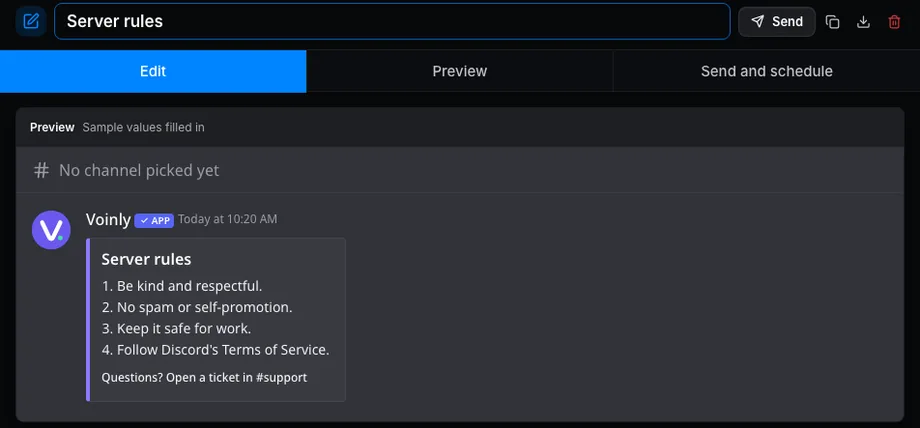
The preview shows the embed the way Discord will draw it. -
Add buttons or a menu (optional)
Under "Buttons and menus", add up to 5 rows, each with up to 5 buttons or one select menu. A link button opens a website. Other buttons run actions when clicked: reply to the member, post in a channel, DM the member, give, take or toggle roles, switch to other roles, change the message to another template, or delete the message.
-
Send it to a channel
Open the "Send and schedule" tab, pick a channel and press "Send message". Unsaved changes are saved first. Voinly needs to see the channel, send messages and embed links there.
-
Edit it later without reposting
Changed your rules? Paste the posted message's link into "Update a message" on the same tab and press "Update message". To copy the link in Discord, right-click the message (long-press on mobile) and choose Copy Message Link. The message keeps its place and its buttons keep working.
-
Post it from Discord, schedule it or pin it
Run
/sendwith the template's name and a channel to post it from Discord. For a quick one-off,/embedopens a short form instead. To repeat a template on a timetable, add it in Scheduled messages; to keep it at the bottom of a channel, use Sticky messages. Both pick it with "Use a saved template".
Embed guide commands
| Command | What it does | Who can use it |
|---|---|---|
/send <template> [channel] | Send a saved template to a channel. | Bot managers |
/embed [channel] | Fill in a short form and post an embed. | Bot managers |
Frequently asked questions
Who can use /embed and /send?
Does @everyone in an embed ping people?
/send, @everyone and @here only ping when Let /send ping @everyone and @here is on.Can I copy an embed from another bot or a JSON file?
Why does my embed show as a plain link or not at all?
Is the embed builder free?
/embed, /send and scheduling are free, like every Voinly module.Add Voinly to your server
Every Voinly module is free. The only paid extras are Custom bot and extra AI moderation scans (see pricing). Add it to Discord and set it up from the dashboard.
Add to Discord