
How to make an application form in Discord
To make an application form in Discord, use a bot that opens a pop-up form when members click a button and posts their answers to a staff channel. Voinly's Forms module does this for free: up to 25 forms with up to 5 questions each, a panel with a button per form, and role limits on who can apply.
Updated
How forms work inside Discord
A Discord form is a pop-up window, called a modal, that a bot opens when someone clicks a button or runs a command. Members fill it in without leaving Discord, and the bot gets the answers. That beats a link to an outside form: you know exactly which Discord account applied, and nobody can apply as someone else.
Discord sets the limits: a pop-up holds at most 5 questions, each question can be up to 45 characters long, and each answer is either a short line or a paragraph. Plan your questions around that. A written answer is not a vote. If members only need to pick from a list, use the voting bot guide instead of a form.
Write questions that get useful answers
- Ask one thing per question, like "How old are you?" and "What time zone are you in?", instead of one long question nobody answers fully.
- Use a paragraph answer for "why" questions and a short answer for facts.
- Use the hint to show the format you want, such as "e.g. UTC+1, weekday evenings".
- Need more than 5 questions? Split the application in two forms, or open a ticket topic with its own questions so staff can follow up in a private conversation.
Prepare a private submissions channel
Create a channel only staff can see, such as #applications: in its settings, open Permissions and turn off View Channel for @everyone, then allow your staff role. Voinly needs to view the channel and send messages and embeds there. If only some members may apply, create a role for them first, for example a "Level 10" role from leveling.
Example: a staff application form
A staff application that fits in one pop-up:
| Question | Answer | Why ask it |
|---|---|---|
| How old are you? | Short answer | Some roles need a minimum age. |
| What time zone are you in? | Short answer | Shows when they can cover the chat. |
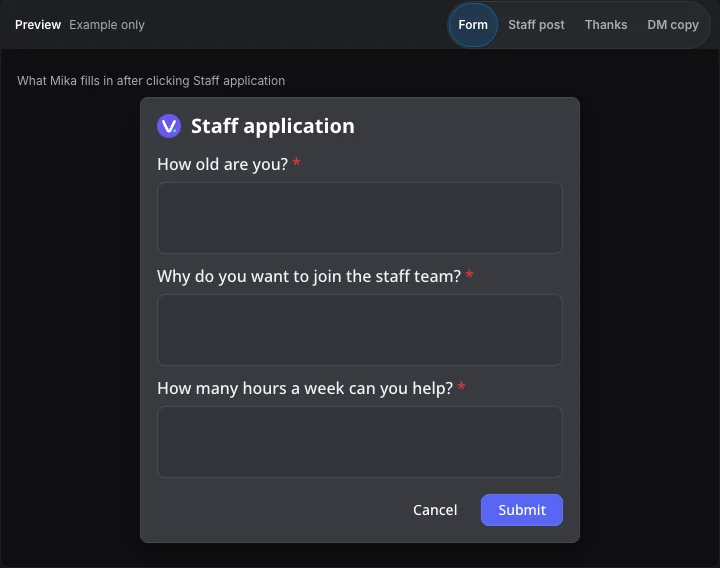
| Why do you want to join the staff team? | Paragraph | The answer that tells you the most. |
| How would you handle a member spamming? | Paragraph | A quick check of judgment. |
| How many hours a week can you help? | Short answer | Sets expectations on both sides. |
How to make an application form with Voinly
-
Open Forms and turn it on
In the dashboard, open Forms and press "Turn on Forms". In Where answers go, pick the Submissions channel where every form posts its answers.
-
Create the form
Press "New form" and enter a Form name, such as "Staff application". Members pick the form by this name in
/form, and it is the label on its panel button. Keep Members can fill this in on; switch it off later to close applications without deleting the form. -
Add up to 5 questions
For each question, write the Question, choose the Answer type (Short answer or Paragraph), decide if it is Required, and add a Hint shown inside the empty box. The preview shows the exact pop-up members get, and "Send test to answers channel" posts a sample answer card so you can check Voinly can post there.
-
Limit who can apply
Open "More options" on the form. Who can fill it in takes up to 10 roles; leave it empty to let everyone apply. Send answers to gives this form its own channel instead of the submissions channel, and Button emoji and What it's for dress up its button.
-
Set pings and the member's copy
Back in Where answers go, add up to 5 roles to Ping for a new submission so staff notice new applications, and turn on Send the member a copy of their answers if applicants should get a DM receipt. Members who block DMs from the server simply don't get it.
-
Post the form panel
In Form panel, choose the Channel members can see, edit the panel message and its Button color, and press "Post panel". The panel has one button per form, so nobody has to remember
/form. Then click your own button and send a test application.
Application form guide commands
| Command | What it does | Who can use it |
|---|---|---|
/form [name] | Fill in one of this server's forms, or list the ones you can fill in. | Everyone |
Frequently asked questions
Why can a form only have 5 questions?
Applications don't arrive in the staff channel
A member says the form button doesn't work for them
/form to see which forms they can fill in.Can I use forms for things other than staff applications?
Is it free?
Add Voinly to your server
Every Voinly module is free. The only paid extras are Custom bot and extra AI moderation scans (see pricing). Add it to Discord and set it up from the dashboard.
Add to Discord