
A Discord application bot for forms and surveys
Voinly is a free application bot for Discord. Build a form in the dashboard, post a panel with a button for it, and members answer in a Discord pop-up without leaving the server. Their answers arrive as a tidy card in the channel your staff read, ready to review.
Up to 25 forms, each with up to 5 questions
A form is a name, an optional emoji and description, and its questions. Each server can have up to 25 forms, so a staff application, a partner request, an event signup and a feedback survey can all live side by side.
Each form holds up to 5 questions. That number comes from Discord: forms open in a Discord pop-up (a modal), and a pop-up shows at most five input boxes. Each question can be a short answer or a paragraph, required or optional, with a hint inside the empty box. If you need more than five answers, split the topic into two forms, or ask the follow-up questions once the member is in a conversation with staff.
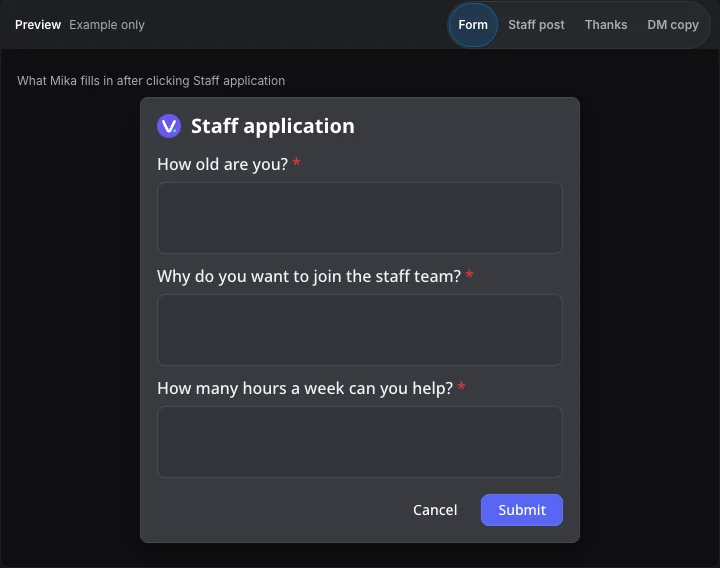
Answers go to your staff, with a ping and a copy for the member
- Submissions channel. Every form posts its answers there as a card showing who sent it and what they answered. A single form can send its answers to a different channel instead, so applications and bug reports don't mix.
- Ping roles. Mention up to 5 roles once per submission, so reviewers notice new applications.
- A copy for the member. Voinly can DM the member their own answers, with your footer. Members who block DMs from the server simply don't get it.
- Thank-you reply. A short confirmation, in your words and color, tells the member their answers were sent.
Decide who can fill in each form
Each form can be limited to up to 10 roles. Leave it empty and everyone can fill it in. A moderator application can require a Member or Level 10 role, while a feedback survey stays open to everyone. Members only see the forms they can use when they run /form.
What servers use an application bot for
- Staff applications. Ask for age, time zone, experience and why they want to help.
- Event signups. Collect in-game names, teams or availability for a tournament.
- Surveys. Ask members what they think of a change, with paragraph answers instead of a two-option poll.
- Requests. Partnership requests, artist commissions or content submissions.
Set up the application bot in 4 steps
-
Pick where answers go
Open the Voinly dashboard and go to Forms. Under Where answers go, choose a private staff channel as the submissions channel and, if you like, the roles to ping.
-
Write the form
Under Forms, press New form. Give it a name such as Staff application, add up to 5 questions, and choose who can fill it in. The preview shows what members and staff will see.
-
Post the panel
Under Form panel, pick a channel members can see, choose a button color and press Post panel.
-
Send a test
Press your form's button, answer the questions and check that the card lands in the submissions channel and the copy reaches your DMs. The step-by-step application form guide covers every option.
Application bot commands
| Command | What it does | Who can use it |
|---|---|---|
/form [name] | Fill in one of this server's forms, or list the ones you can fill in. | Everyone |
Frequently asked questions
Is the application bot free?
Why can a form only have 5 questions?
Can I make an application only some members can see?
/form.Where do I read the answers?
Can a member get a ticket from their application?
Add Voinly to your server
Every Voinly module is free. The only paid extras are Custom bot and extra AI moderation scans (see pricing). Add it to Discord and set it up from the dashboard.
Add to Discord