
How to Do a Giveaway on Discord
To do a giveaway on Discord, use a Discord giveaway bot: you post the prize, members enter with one click, and the bot picks random winners when time runs out. With Voinly you start one with /giveaway start or from the dashboard, add entry requirements and bonus entries, and reroll if needed, for free.
Updated
Quick steps
The short version of a Discord giveaway bot. The command options and the draw are below. For a question where everyone picks an answer, use the voting bot for Discord. A greeting for new members is the welcome message guide, who invited them is the invite tracker bot (invite tracker guide), and a private room is temp voice.
- Turn on Giveaways and choose who may host.
- Run
/giveaway startwith a duration, a winner count and a prize, or use the All giveaways tab. - Add required roles, a minimum account age or time in the server if you want them.
- Wait for the draw, or run
/giveaway rerollif a winner does not claim the prize.
Plan a fair giveaway first
A giveaway goes smoothly when the rules are clear before anyone enters:
- Say exactly what the prize is and how the winner receives it, such as a gift link by DM within 48 hours.
- Never ask for payment or purchases to enter. Entry should be free.
- Pick a length that fits: a few hours for a quick drop, a few days so every time zone can enter.
- Use requirements to stop alt accounts, such as a minimum account age or time in the server, rather than checking entrants by hand.
- Say how long winners have to claim, so a reroll is fair if someone doesn't answer.
Options of /giveaway start
Only the first three are needed. The rest add rules and rewards:
| Option | What it does | Example |
|---|---|---|
duration | How long it runs, from 1 minute up to 60 days | 1d 12h |
winners | How many winners to pick, 1 to 90 | 2 |
prize | What you're giving away | Discord Nitro |
channel | Where to post it; defaults to the current channel | #giveaways |
description | Extra details shown in the giveaway | How to claim |
required_roles | Roles needed to enter; role_mode picks any or all | @Level 10 |
blocked_roles | Roles that can't enter | @Muted |
account_age | Minimum Discord account age | 7d |
time_in_server | Minimum time in your server | 1d |
bonus_entries | Extra entries per role | @Booster 2, @VIP 3 |
reward_xp | XP each winner also gets (needs Levels) | 500 |
reward_coins | Coins each winner also gets (needs Economy) | 1000 |
How Voinly picks winners
When the time is up, Voinly draws at random from everyone who entered. Each entrant has one entry, plus the bonus entries their roles give, so a member with @Booster 2 is three times as likely to win as someone without it. Requirements are checked when a member enters and again at the draw, and bots and members who left the server are skipped. A reroll never picks someone who already won that giveaway.
After the giveaway
Voinly posts the winner announcement as a reply to the giveaway and, if you turned it on, DMs the winners and the host. Contact the winner, deliver the prize as promised, and reroll if they don't answer in the time you announced. The All giveaways tab in the dashboard keeps every running and ended giveaway with its entries and winners, so you can always show how a draw went.
A vote is a different job from a draw. The voting bot guide covers questions where everyone picks an answer. Running giveaways often? Make Giveaway host roles a small team, and use a dedicated #giveaways channel with a ping role members opt into, so the rest of the server isn't pinged each time.
How to run a giveaway with Voinly
-
Turn on Giveaways and choose hosts
In the dashboard, open Giveaways and press "Turn on Giveaways". In Hosting, add Giveaway host roles for the people who may start, end and reroll giveaways (members with Manage Server always can), and optionally Mention a role when a giveaway starts.
-
Style the giveaway message
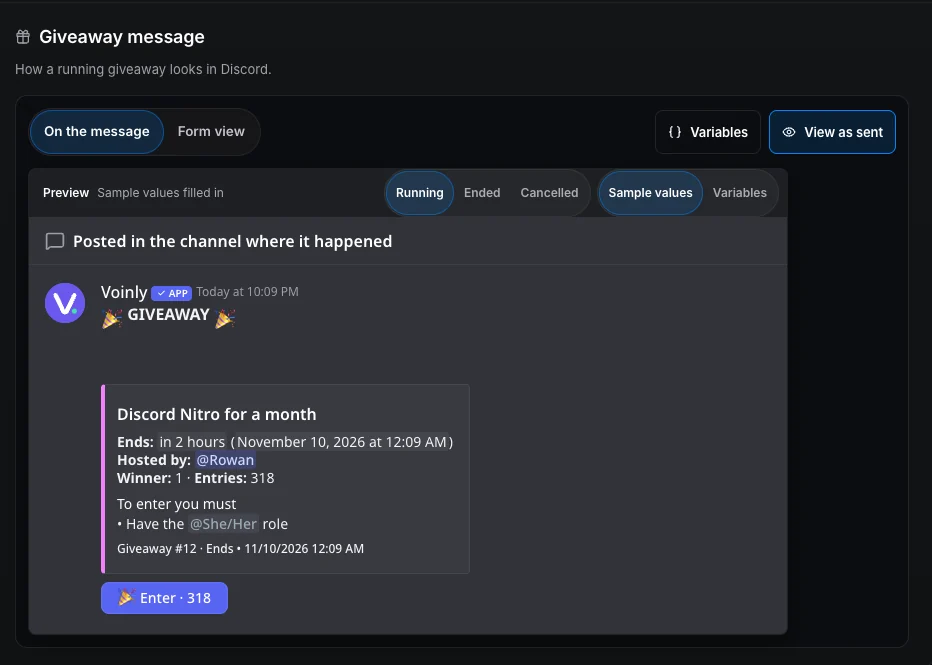
In Giveaway message, edit the embed members see, the Button label, Button emoji and Button color. Keep Show the number of entries on the button on, so members see the entry count go up. The preview switches between running, ended and cancelled.
-
Set the winner messages
In Announcing winners, edit the Winner announcement, When nobody can win and Reroll announcement, which are posted as replies to the giveaway. Under Direct messages, turn on DM the winners and DM the host the results.
-
Start the giveaway
In Discord, run
/giveaway startwith a duration, the number of winners and the prize, for exampleduration: 2d winners: 1 prize: Discord Nitro. Prefer the dashboard? The All giveaways tab has a form to start one, and nothing is posted until you press "Start giveaway". For a quick one,!gstart 1h 1 Steam keyworks with your prefix. -
Add requirements and bonus entries
Add
required_roles,blocked_roles,account_ageortime_in_serverto the command to control who can enter, andbonus_entriesto reward roles like boosters. The requirements are listed on the giveaway, and a member who doesn't meet them gets a private message saying what is missing. -
End, reroll or cancel
The giveaway ends on its own.
/giveaway endends it early and picks winners now,/giveaway rerollpicks new winners for an ended giveaway, and/giveaway cancelstops it without winners. Use the giveaway's number or message link, and/giveaway listto see what is running.
Giveaway guide commands
| Command | What it does | Who can use it |
|---|---|---|
/giveaway start <duration> <winners> <prize> [channel] [options…] | Start a giveaway. Options add required or blocked roles, a minimum account age or time in the server, and bonus entries. | Giveaway host |
!gstart <duration> <winners> <prize> | Start a giveaway quickly. | Giveaway host |
/giveaway end <giveaway> | End a giveaway now and pick the winners. | Giveaway host |
/giveaway reroll <giveaway> [winners] | Pick new winners for an ended giveaway. | Giveaway host |
/giveaway cancel <giveaway> | Stop a giveaway without picking winners. | Giveaway host |
/giveaway list | Show the giveaways running in this server. | Everyone |
Frequently asked questions
Members say they can't enter
Nothing is posted when I start a giveaway
Can I reroll a winner who didn't claim the prize?
/giveaway reroll with the giveaway's number or link and how many new winners you need. Earlier winners of that giveaway are left out of the reroll.Is the draw really random?
Is it free?
What is a Discord giveaway bot?
/giveaway reroll. The giveaway bot page is the short version of this guide.How do I start a giveaway on Discord?
/giveaway start with a duration, a winner count and a prize, for example duration: 2d winners: 1 prize: Discord Nitro. The All giveaways tab posts the same giveaway, and !gstart 1h 1 Steam key is the short prefix form.Can a giveaway require a role or an older account?
/giveaway start can take required roles, blocked roles, a minimum account age and a minimum time in the server. Those checks run again when the winners are picked.Add Voinly to your server
Every Voinly module is free. The only paid extras are Custom bot and extra AI moderation scans (see pricing). Add it to Discord and set it up from the dashboard.
Add to Discord