
How to post YouTube notifications in Discord automatically
Discord has no built-in way to announce new YouTube uploads, so you need a bot that watches the channel and posts for you. With Voinly, YouTube notifications take a few minutes to set up: paste the channel's link or @handle, pick a Discord channel, choose videos, Shorts or live streams, and optionally ping a role.
Updated
Prepare a Discord channel
Make a channel such as #uploads. It can be a text, announcement or forum channel. Let Voinly view and send messages there, and if you'll ping a role, make the role mentionable or give Voinly permission to mention it.
Many servers make a Notifications role that members pick themselves with reaction roles, so only people who want the ping get it.
Which YouTube address to paste
The YouTube channel box takes the channel's link, its @handle or its channel ID. Any of these work:
- an @handle, like
@mychannel, or a link such asyoutube.com/@mychannel; - a channel link,
youtube.com/channel/UC…, or just the ID that starts withUC; - older
youtube.com/c/…andyoutube.com/user/…links.
Check before you save
Press Check next to the box and Voinly shows the account it found, so you know it is the right channel and not a fan account with a similar name. A playlist or search link won't work: open the channel itself and copy its address.
Videos, Shorts or live streams
Post these chooses what gets announced: Videos, Shorts and Live streams and premieres. All three are on by default. Live streams and premieres are announced when they're scheduled or go live. A gaming channel that posts many Shorts often keeps only Videos and Live, or sends Shorts to a separate channel by adding the same YouTube channel twice.
Ping roles, filters and the message
- Ping roles: up to 10 roles, mentioned where
{pingroles}is in the message, or at the start if it isn't. - Only post if the title contains: leave empty to post everything. Not case-sensitive. Useful for series, like
tutorialorpart. - Skip if the title contains: for words you never want posted, like
sponsor. - Message: plain text, an embed or both, with buttons. Variables include
{title},{url},{channel_name},{thumbnail}and{type}, with a live preview.
How fast posts arrive
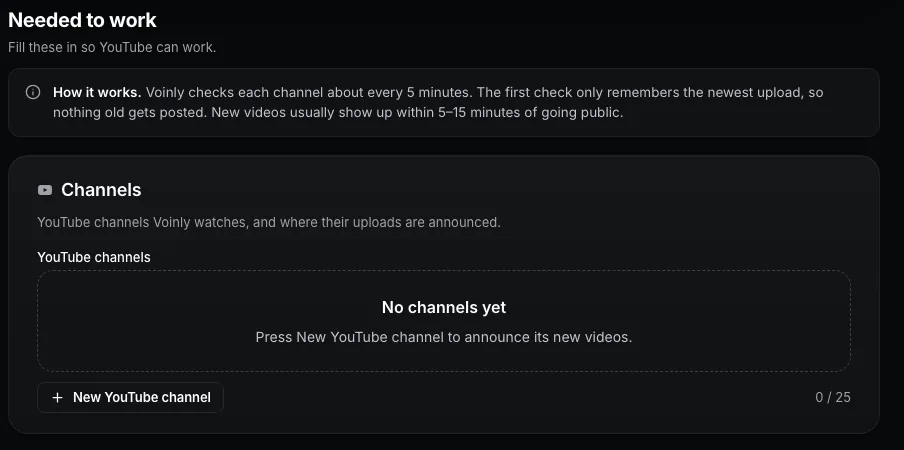
Voinly checks each YouTube channel about every 5 minutes, so a new video usually shows up within 5 to 15 minutes of going public. The first check only remembers the newest upload, so adding a channel never floods your server with old videos.
Announcement channels and auto-publish
If you post in an announcement channel, turn on Publish in announcement channels. Voinly then publishes (crossposts) each message, so other servers that follow your announcement channel get the upload too. Without it, the post stays in your server only.
Write an upload post people click
The default message mentions your ping roles, names the channel and links the video, and Discord shows the video's player under the link. That is often all you need. If you want more, a few ideas that work well:
- Put
{title}in bold in the first line, so the post reads well in notifications. - Use
{type}to word it differently for a live stream and a video in one message. - Add a button that links to
{channel_url}so new members can subscribe. - Keep the ping for members who opted in, rather than
@everyoneon every upload.
Pausing a channel
Each YouTube channel has an Active switch. Turn it off to pause posts without losing its settings, for example while a creator re-uploads old videos.
Troubleshooting YouTube notifications
Nothing was posted for a new video
Run /notifications list: it shows every account the server follows and when each last posted, or a warning if a channel can't be read. Check the type filters and title keywords, and that the feed's Active switch is on.
The role wasn't pinged
The role must be in Ping roles, and Voinly needs permission to mention it. If you removed {pingroles} from a custom message, the ping goes at the start.
Set up YouTube notifications with Voinly
-
Open YouTube in the dashboard
Open YouTube under Social notifications and press New YouTube channel. You can follow up to 25 channels per server.
-
Paste the channel
Paste the @handle, channel link or channel ID into YouTube channel and press Check. Pick the Discord channel under Post in.
-
Choose types, pings and filters
Set Post these, add Ping roles, and fill in the title filters if you only want some uploads. Edit the Message with the live preview.
-
Turn it on and test
Turn on Publish in announcement channels if it applies, press Turn on YouTube, then run
/notifications testwith the channel to post its latest upload and see exactly how it looks.
YouTube alerts guide commands
| Command | What it does | Who can use it |
|---|---|---|
/notifications list | See every account this server follows and when each last posted. | Manage Server |
/notifications test <account> | Post the latest update from a followed account, to check how it looks. | Manage Server |
Frequently asked questions
Can Discord post YouTube uploads without a bot?
Can I get notifications for someone else's YouTube channel?
Can I post Shorts and videos in different channels?
How quickly does a new video get posted?
Are YouTube notifications free?
Add Voinly to your server
Every Voinly module is free. The only paid extras are Custom bot and extra AI moderation scans (see pricing). Add it to Discord and set it up from the dashboard.
Add to Discord